[ECO Bounty] iopay Send Image Is Same In Watch Mode and my Wallet
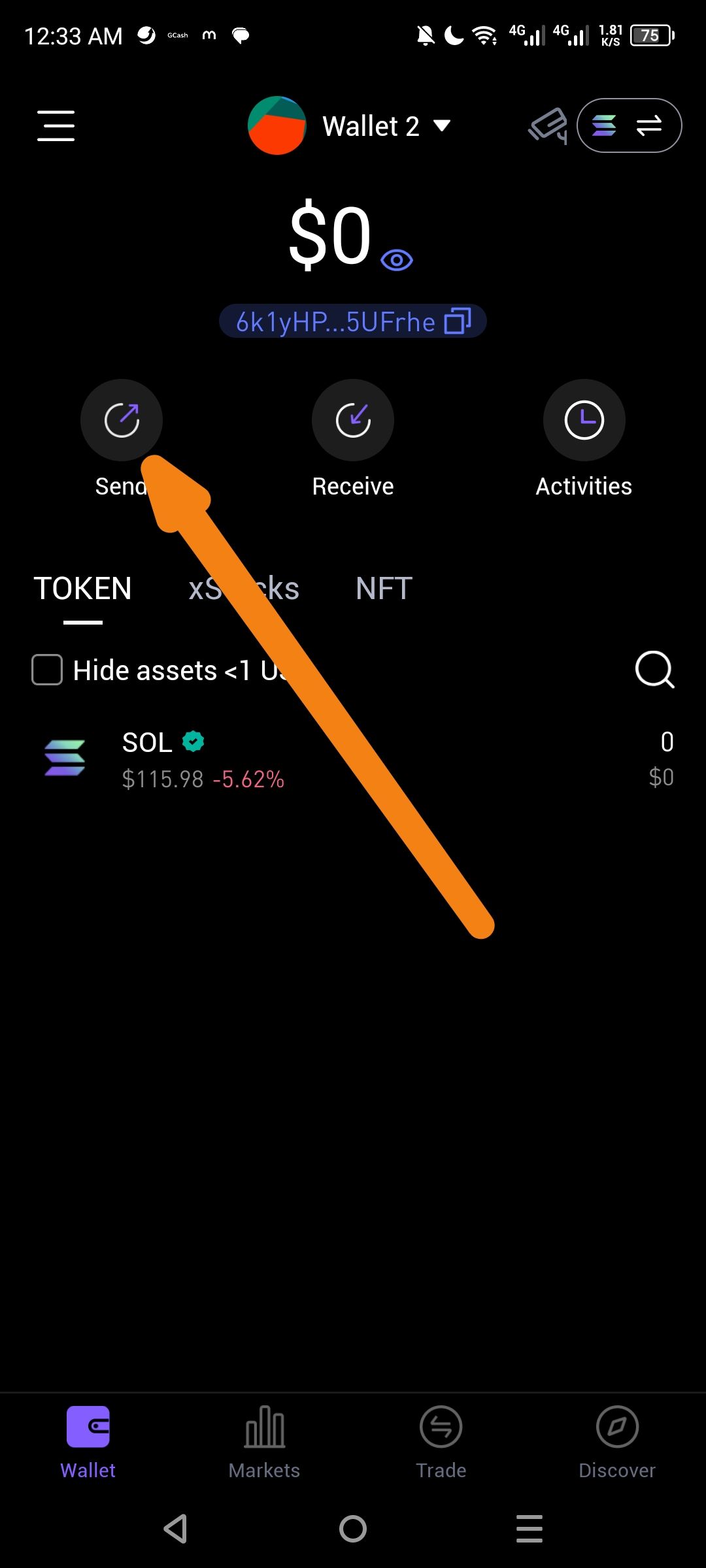
Description
The "Send" button icon/image appears identical in Watch Mode (view-only mode) and the user's personal wallet interface. This lacks visual distinction, potentially confusing users who expect a different appearance (e.g., grayed out or altered icon) in Watch Mode to indicate that sending is not possible. The screenshot highlights the "Send" button with an orange arrow in a wallet named "Wallet 2" (indicated as Watch Mode by the orange dot/circle next to the name).
Steps to Reproduce
Open the wallet app on Android.
Navigate to Watch Mode for a wallet (e.g., "Wallet 2" – confirmed by orange dot indicator).
View the main wallet screen showing assets (e.g., 64.1 ETH-SUI, SOL, etc.).
Observe the Send button icon.
Switch to (or compare with) a personal (non-watch) wallet mode.
Observe the Send button icon again.
Expected Behavior:
The "Send" button should have a distinct visual indicator in Watch Mode, such as:
Grayed-out or disabled appearance.
Different icon (e.g., locked/eye symbol).
Tooltip or label clarifying "View Only – Cannot Send".
Actual Behavior:
The "Send" button icon is identical in both modes, leading to potential confusion.
Wallet Address: io1tkw393kejmxwnd454twc6020sxcyvh5dxqmren
Device & Environment:
-Operating system: Android 13
-Device model: Redmi Note 10 Pro
Log in to comment and vote
No comments yet
Be the first to share your thoughts.