Wallet Address:
io1tkw393kejmxwnd454twc6020sxcyvh5dxqmrenApp Version: ioPay v5.2.0 (1)
Device: iPhone XR
OS: iOS 18.7.3
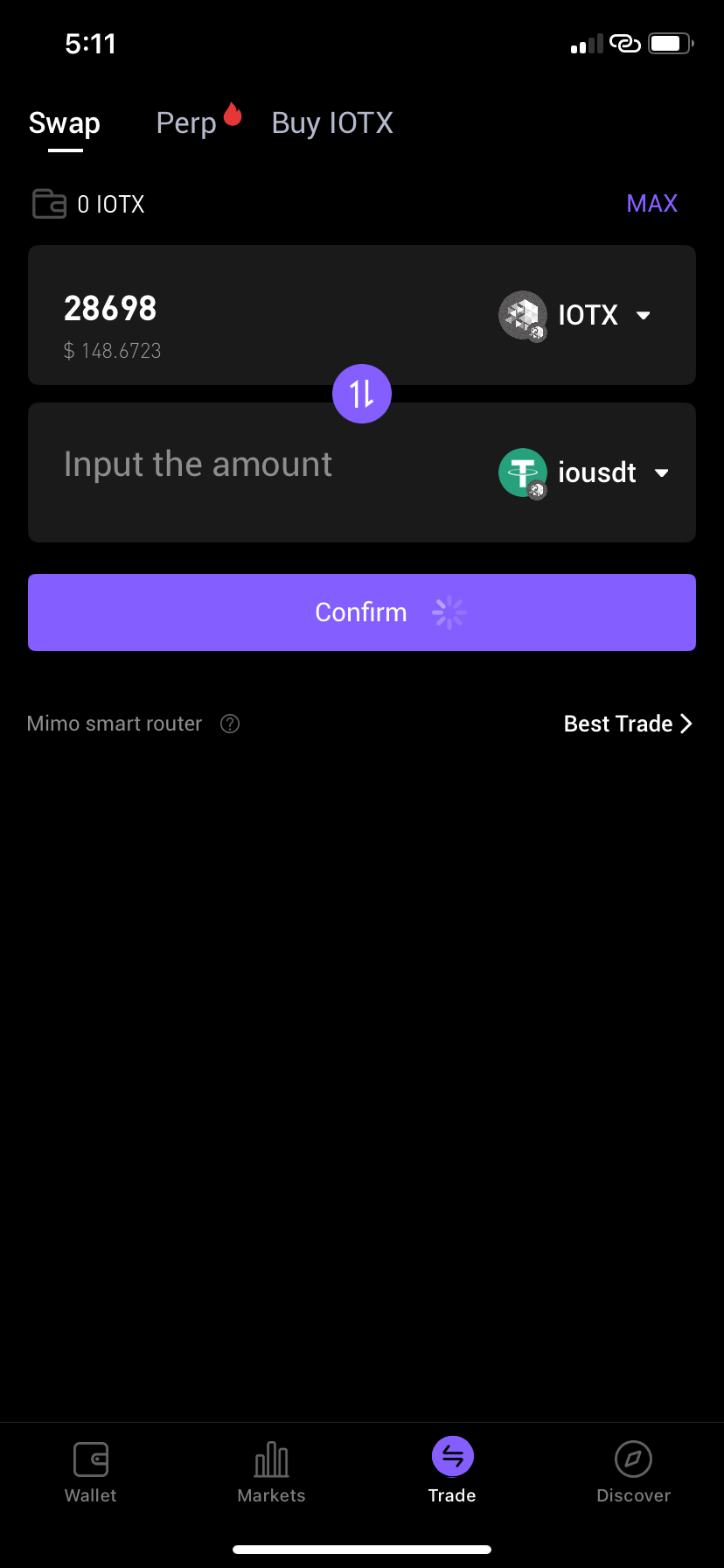
Issue Summary: The swap interface fails to calculate or display an output amount when a valid input is provided, preventing users from completing trades within the app.
Detailed Description:
Location:
Trade Tab->SwapObservation: Upon entering an input of
28698IOTX, the "To" field (ioUSDT) remains stuck on "Input the amount."Technical Failure: The "Confirm" button displays a persistent loading spinner, and the "Mimo smart router" fails to fetch or display the "Best Trade" path. The UI does not refresh with the estimated return or exchange rate.
Steps to Reproduce:
Launch ioPay v5.2.0 (1) on an iPhone XR (iOS 18.7.3).
Navigate to the Trade icon in the bottom navigation bar.
Ensure the Swap sub-tab is selected.
Select IOTX as the "From" asset and ioUSDT as the "To" asset.
Enter a numerical value in the IOTX field.
Observe: The output field fails to populate and the confirmation button hangs in a loading state.
Expected Result: The Mimo smart router should instantly calculate the exchange rate and populate the "To" field with the corresponding ioUSDT amount, enabling the "Confirm" button.
Actual Result: The interface hangs; no output price is generated, and the user is unable to proceed with the transaction.
