[Eco Bounty] ioPay Swap - Missing Security Warning for Unverified/Unrecognized Contract Addresses
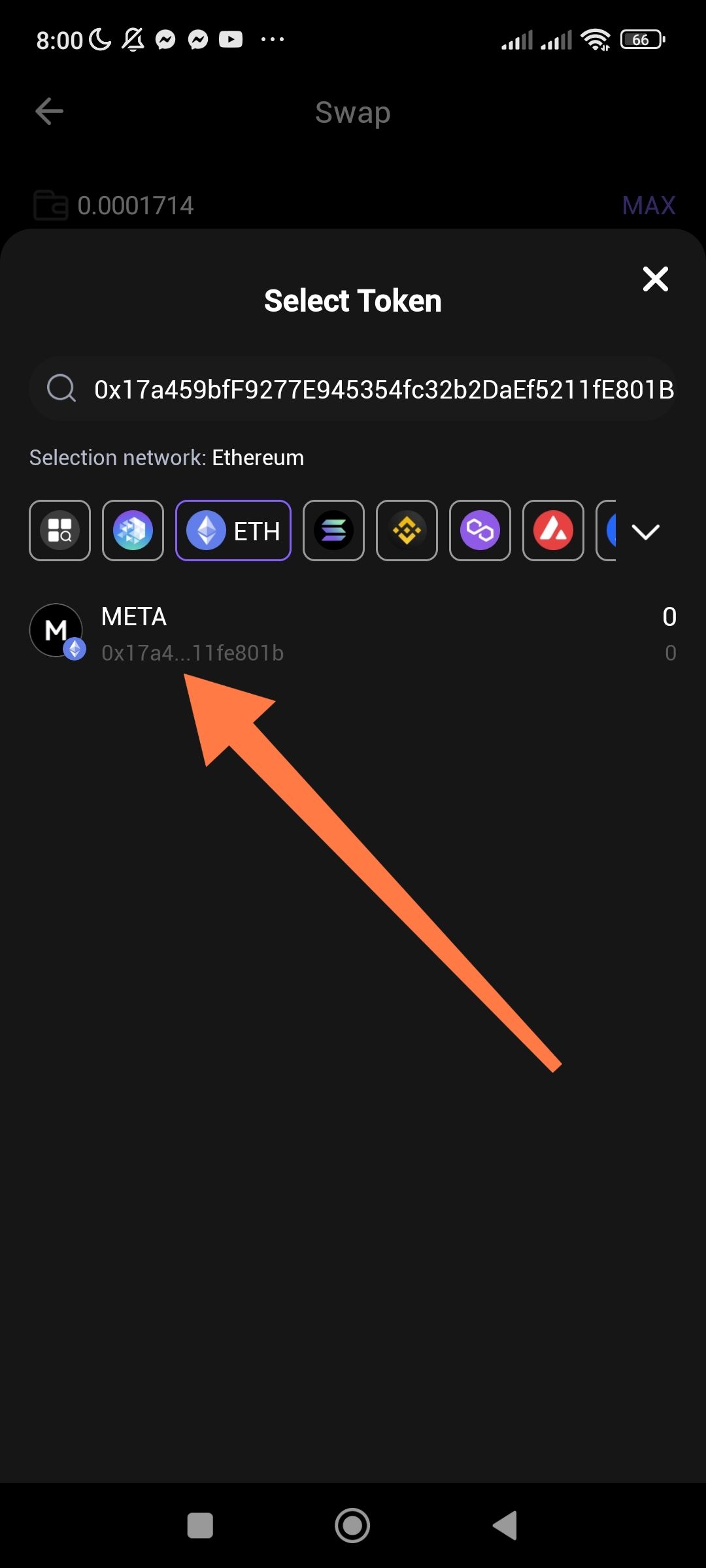
Swap feature displays tokens from arbitrary contract addresses without verification warnings or scam alerts
Severity
High - Security/User Safety Risk
Description
When using the ioPay Swap feature's "Select Token" search functionality, users can input any ERC-20 contract address (including potentially fraudulent or fake tokens), and the app will display the corresponding token without any warning, verification badge, or security notification. This lack of transparency exposes users to potential scam tokens that may mimic legitimate projects.
Steps to Reproduce
Open ioPay mobile app
Navigate to Swap feature
Tap to select a token
In the search field, paste the contract address:
0x17a459bfF9277E945354fc32b2DaEf5211fE801BObserve that the token "META" appears in the results
Issue: No warning, verification status, or risk indicator is displayed
Expected Behavior
Warning Banner: Display a prominent warning when a token is not in the verified/trusted token list
Verification Badge: Indicate whether the token is verified by ioPay, CoinGecko, CoinMarketCap, or similar trusted sources
Risk Indicator: Show a "Unverified Token" or "Custom Token" label with a warning icon
User Confirmation: Require explicit user acknowledgment before allowing swaps with unverified contracts
Actual Behavior
The token appears seamlessly in the search results
No visual distinction between verified and unverified tokens
No warning that the contract address may be fraudulent, unaudited, or potentially malicious
Users could easily mistake fake tokens for legitimate ones (e.g., "META" could impersonate Meta/ Facebook-related tokens or other legitimate META tokens)
Environment
App: ioPay Wallet Latest Version
Feature: Swap → Select Token
Network: Ethereum
Device: Android
Contract Address Tested:
0x17a459bfF9277E945354fc32b2DaEf5211fE801B
Impact
User Risk: Users may accidentally swap valuable assets for worthless scam tokens
Impersonation: Malicious actors can create tokens with names matching legitimate projects to deceive users
Reputation: Lack of safety features compared to competitors (MetaMask, Trust Wallet, 1inch) which typically show warnings
Suggested Improvements
Implement Token Verification Database: Cross-reference against CoinGecko, CoinMarketCap, and community-maintained scam token lists
Visual Warning System:
Yellow warning icon for unverified tokens
Red warning for known scam addresses
"Import at Your Own Risk" Flow: Force a confirmation modal explaining risks before adding custom tokens
Community Reporting: Allow users to flag suspicious tokens
Screenshot
Attached: Shows META token appearing for address 0x17a459bfF9277E945354fc32b2DaEf5211fE801B with no warning indicators
Recommended Priority: 🔴 High (Security Enhancement)
Wallet Address: io1tkw393kejmxwnd454twc6020sxcyvh5dxqmren
Device & Environment:
-Operating system: Android 13
-Device model: Redmi Note 10 Pro
Log in to comment and vote
No comments yet
Be the first to share your thoughts.