[ECO Bounty] iopay UI Alignment Inconsistency in Update Modal
Summary
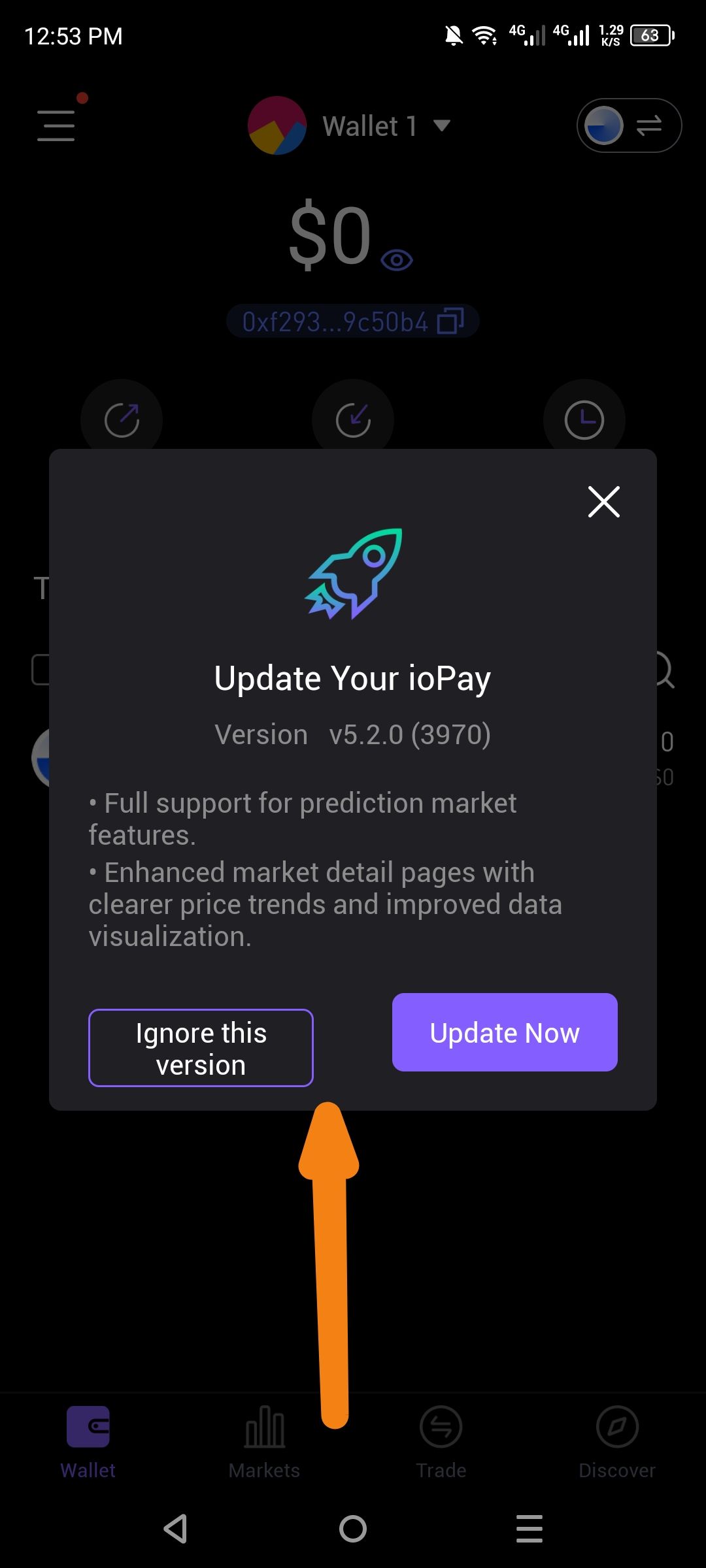
The "Update Your ioPay" modal exhibits a UI layout issue where the action buttons ("Ignore this version" and "Update Now") are not vertically or horizontally aligned. Specifically, the "Ignore this version" button is significantly taller and positioned higher than the "Update Now" button, creating an unbalanced and unprofessional appearance.
App Version
Target Version: v5.2.0 (3970)
Steps to Reproduce
Open the ioPay application.
Trigger the "Update Your ioPay" prompt (usually occurs when a new version is available upon app launch).
Observe the layout of the action buttons at the bottom of the modal.
Expected Behavior
Both buttons should have consistent height, padding, and vertical alignment. Ideally, they should be centered horizontally within the modal container with equal vertical spacing from the text above and the modal edge below.
Actual Behavior
The "Ignore this version" button (secondary) is taller than the "Update Now" button.
The "Update Now" button (primary) is shorter and appears "sunken" or misaligned relative to the secondary button.
The text alignment within the primary button appears vertically off-center compared to the secondary button.
Suggested Fix
Apply a uniform height and flex-alignment (e.g., align-items: center) to the button container in the modal component to ensure both primary and secondary buttons share the same dimensions and baseline.
Wallet Address: io1tkw393kejmxwnd454twc6020sxcyvh5dxqmren
Device & Environment:
-Operating system: Android 13
-Device model: Redmi Note 10 Pro
Log in to comment and vote
No comments yet
Be the first to share your thoughts.