[ECO Bounty] iopay UI Clipping – "Product Launch" Badge Text Cut Off in DePINscan Tab
📍 Description
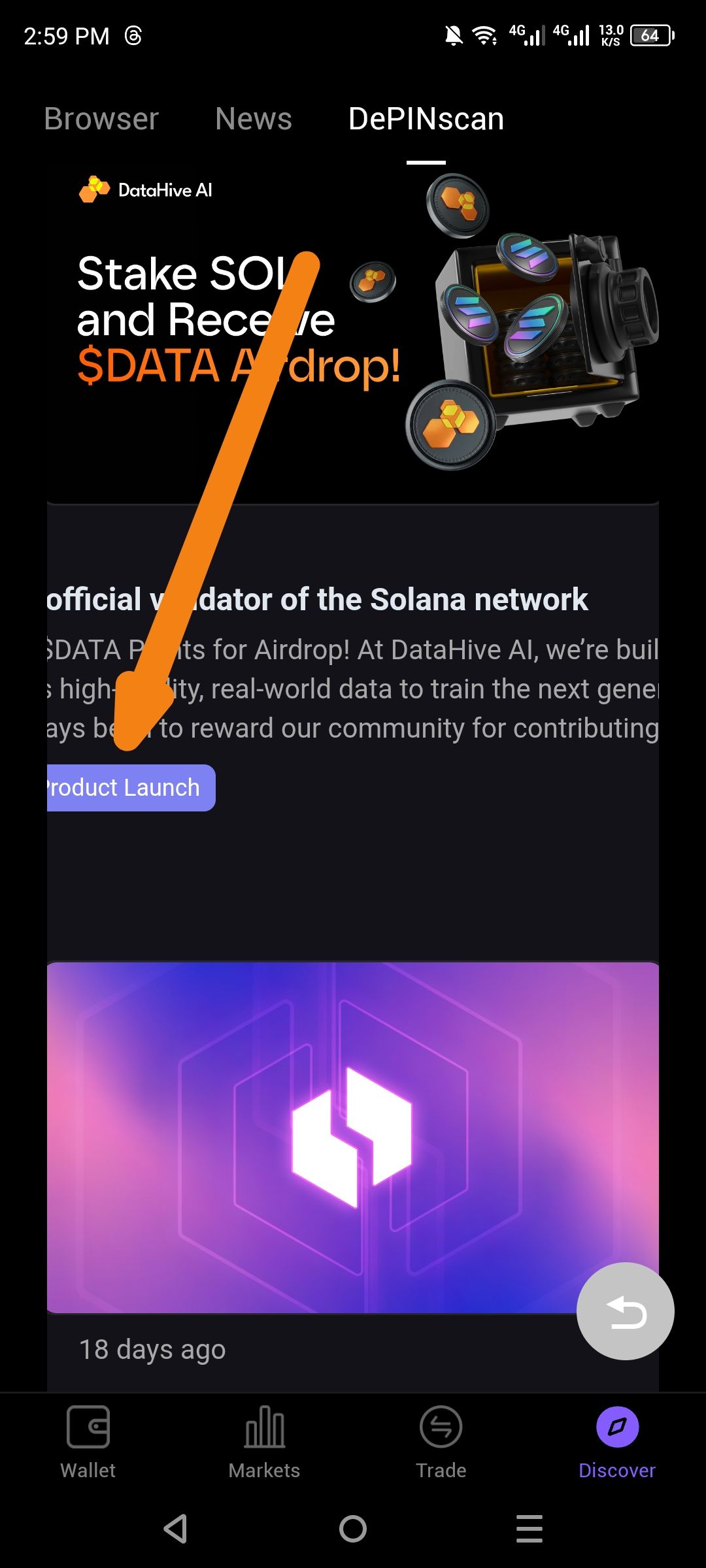
In the Discover → DePINscan section, the content cards feature descriptive tags (e.g., "Product Launch"). As indicated by the orange arrow in the screenshot, the text within the purple badge is being clipped.
The letter "P" in "Product Launch" is partially cut off on the left side, indicating insufficient internal padding or a container margin issue within the component.
🔁 Steps to Reproduce
Open the ioPay mobile app on Android.
Navigate to the Discover tab (bottom navigation).
Tap on the DePINscan tab at the top.
Scroll through the news/article feed.
Observe the purple category tags/badges on the articles.
Result: The first character of the badge text is clipped.
✅ Expected Behavior
The text within the badge should be fully visible and centered.
There should be adequate horizontal padding (e.g.,
padding-left: 8px;) to ensure characters are not cut off by the badge boundary.
❌ Actual Behavior
The text is positioned too far to the left within the badge container.
The leading character ("P") is clipped/cut off at the edge of the purple background.
💡 Suggested Fix
Increase Padding: Update the badge component style to include
padding-inline: 10px;(or equivalent).Text Alignment: Ensure text is set to
text-align: center;within the flex/grid container of the badge.Auto-layout: If using a design system like Figma-to-Code, ensure the "Auto Layout" padding is correctly inherited by the mobile frontend.
Wallet Address: io1tkw393kejmxwnd454twc6020sxcyvh5dxqmren
Device & Environment:
-Operating system: Android 13
-Device model: Redmi Note 10 Pro
Log in to comment and vote
No comments yet
Be the first to share your thoughts.