App Version: ioPay v5.2.0 (1)
Device: iPhone XR
OS Version: iOS 18.7.3
Wallet Address: io1tkw393kejmxwnd454twc6020sxcyvh5dxqmren
Description
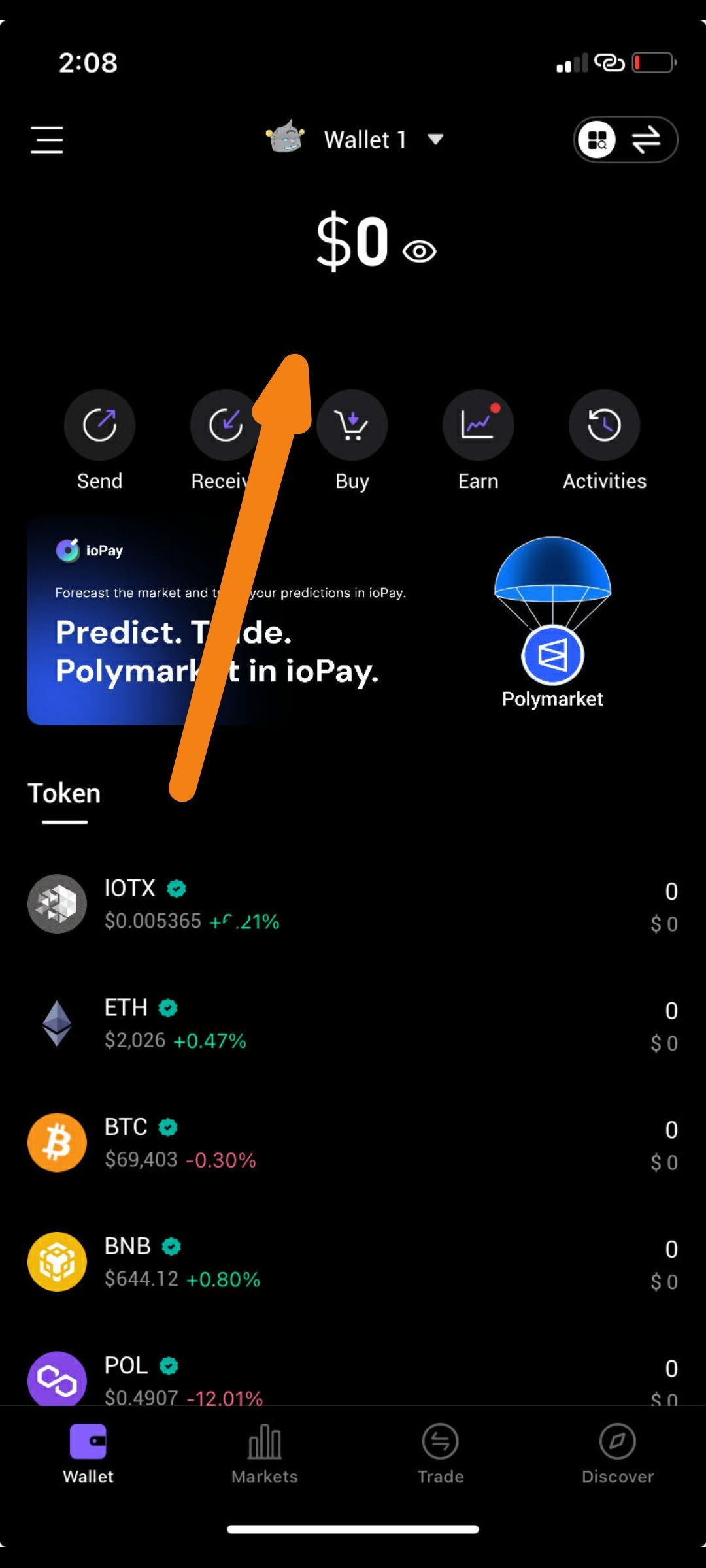
There is a UI rendering issue on the main wallet dashboard specifically in the area directly below the Total Balance ($0). As indicated by the orange arrow in the second screenshot, the spacing or alignment of the action buttons (Send, Receive, Buy, etc.) and the promotional banners (Polymarket) appears to be inconsistent or overlapping with the balance section, causing a cluttered visual experience on the iPhone XR's display.
Steps to Reproduce
Launch ioPay v5.2.0 on an iPhone XR.
Complete the wallet creation/import process so the $0 balance is visible.
Observe the vertical spacing and alignment of the icons (Send, Receive, Buy) and the "Token" header relative to the $0 balance.
Expected Result
A clean, vertically aligned layout with consistent padding between the total balance, the action button row, and the "Token" list.
Actual Result
The elements below the $0 balance appear shifted or poorly padded, creating a fragmented UI layout that doesn't utilize the screen real estate effectively.
Visual Evidence
Screenshot 2: The orange arrow points to the specific dead space or alignment shift occurring between the balance and the feature icons.
Impact
This misalignment affects the professional look of the wallet's primary dashboard and can lead to accidental taps if buttons are too close to other interactive UI elements
