[ECO Bounty] iopay UI Inconsistency & Missing Safety Confirmation
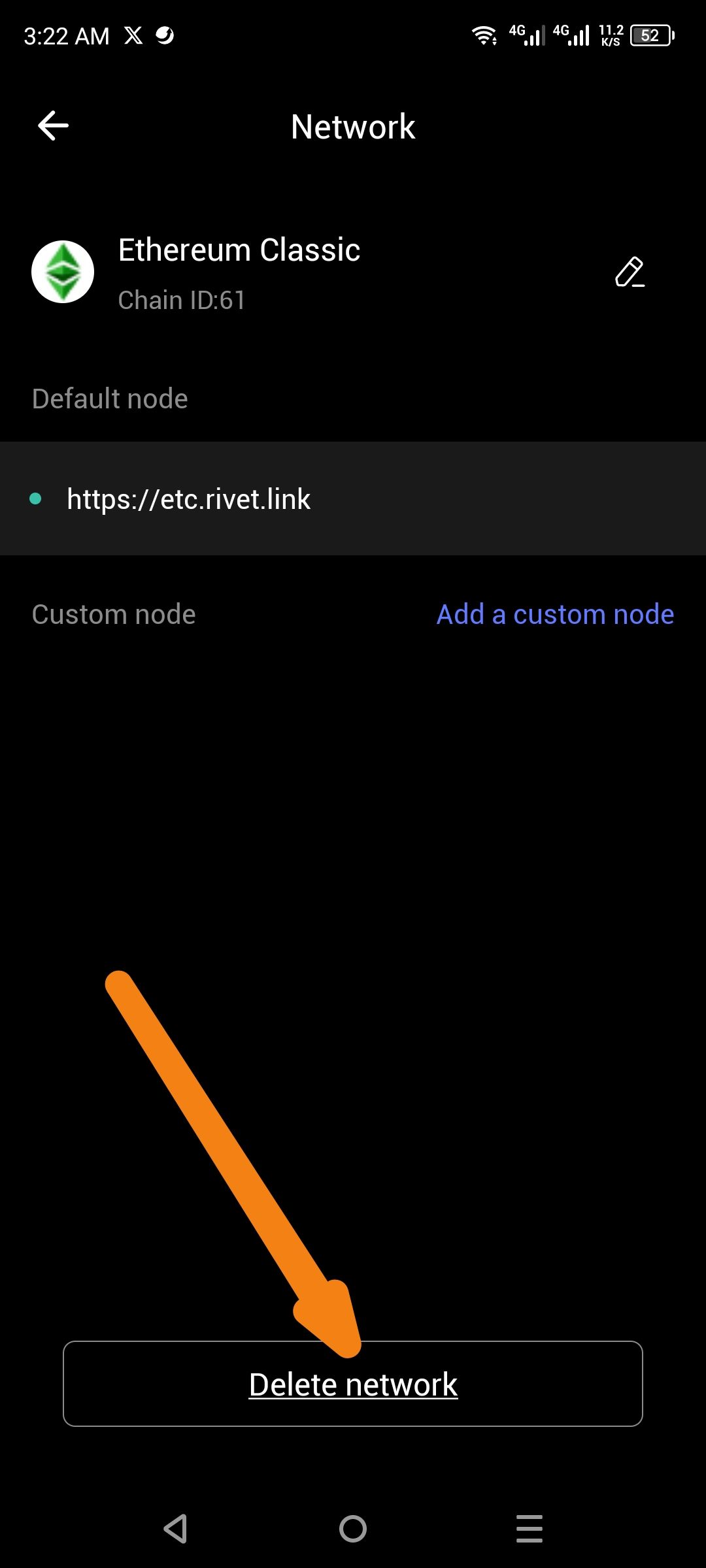
1. UI Inconsistency: Sentence Case vs. Title Case
Issue: The button to remove a network is labeled "Delete network" (sentence case).
Expected Behavior: To maintain UI consistency with standard mobile design patterns and other header elements, the button should use Title Case: "Delete Network".
2. Critical UX Flaw: Missing Deletion Confirmation
Issue: When the "Delete network" button is pressed, the network is removed immediately without an "Are you sure?" prompt.
Risk: This leads to accidental deletions. If a user has added a custom RPC or a non-standard network, they would have to manually find and re-enter the Chain ID and RPC URL to recover it.
Expected Behavior: A confirmation modal (Y/N) should appear:
Delete Network? Are you sure you want to delete this network? This action cannot be undone. [ Cancel ] [ Delete ]
Steps to Reproduce
Navigate to the Settings or Network management screen.
Select a specific network (e.g., Ethereum Classic).
Observe the capitalization on the bottom button ("Delete network").
Tap the button and observe that the network is deleted instantly without any confirmation dialogue.
Wallet Address: io1tkw393kejmxwnd454twc6020sxcyvh5dxqmren
Device & Environment:
-Operating system: Android 13
-Device model: Redmi Note 10 Pro
Log in to comment and vote
No comments yet
Be the first to share your thoughts.