[ECO Bounty] iopay UI Text Overlap in Market Details View
Wallet Address Reporter: io1tkw393kejmxwnd454twc6020sxcyvh5dxqmren
App Version: ioPay v5.3.1 (3973)
Device: Redmi Note 10 Pro (Android 13)
Description
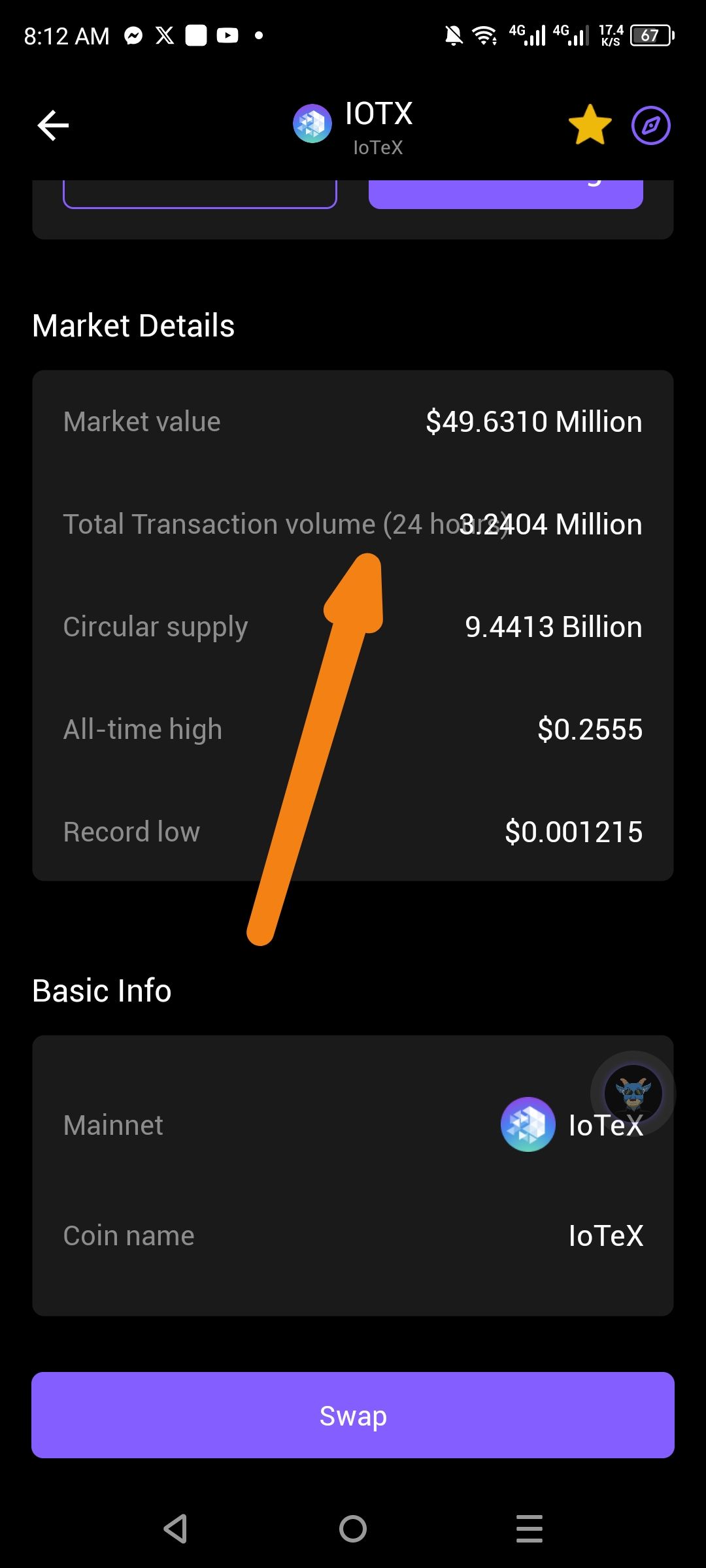
In the Market Details section of a specific asset (e.g., IOTX), the numerical value for the "Total Transaction volume (24 h)" is improperly rendered, causing it to overlap with the descriptive text label. Specifically, the numerical string (e.g., "3.2404 Million") is displayed directly on top of the "h" and following characters of the "24 h" label, making both the label and the data difficult to read.
Steps to Reproduce
Open the ioPay app.
Navigate to the Markets tab.
Select an asset (e.g., IOTX) to view its Market Details.
Scroll down to the Market Details card and observe the "Total Transaction volume (24 h)" row.
Actual Result
The data value is not correctly aligned to the right or spaced away from the label, resulting in a text-on-text overlap that compromises the professional appearance of the financial data.
Expected Result
The numerical value should be right-aligned with adequate padding from the label, similar to the "Circular supply" and "All-time high" rows, ensuring no overlap occurs.
Log in to comment and vote
No comments yet
Be the first to share your thoughts.