[ECO Bounty] iopay UI Text Truncation in BinoAI Input Field
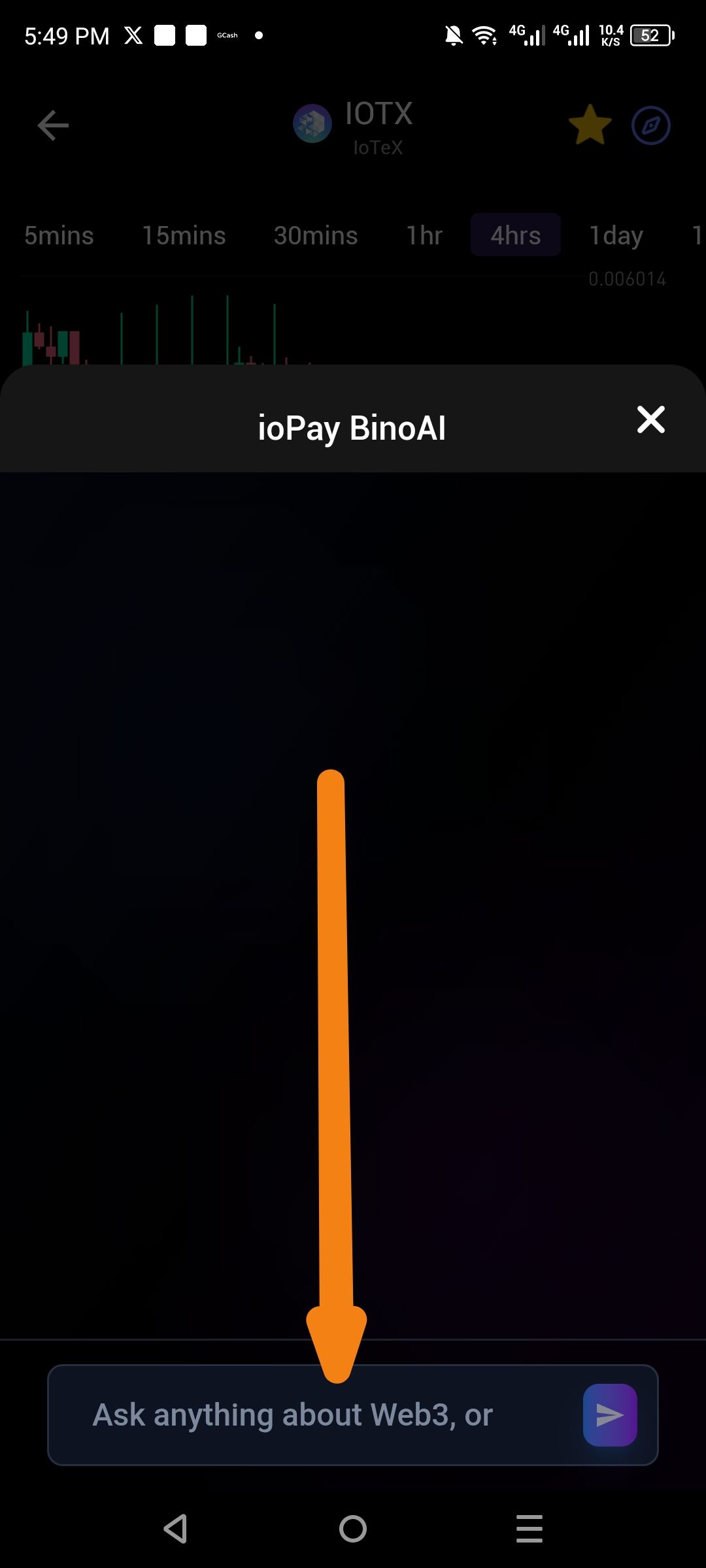
Severity: 🟡 Low (Cosmetic / UI Polish)
Environment:
App: ioPay Mobile Wallet
Feature: BinoAI (within the IOTX price/chart screen)
Device: Android
Description: When opening the BinoAI interface from the IOTX asset screen, the text within the "Ask anything about Web3" input field is truncated or incomplete. The text ends abruptly with "or" and does not show the full prompt, nor does it scale correctly for the screen width.
Steps to Reproduce:
Open the ioPay app.
Navigate to the IOTX asset page.
Click on the BinoAI icon/tool.
Observe the input field at the bottom of the screen.
Actual Result: The text in the search/input bar is cut off (e.g., "Ask anything about Web3, or...").
Expected Result: The full placeholder text should be visible, or it should wrap/elide properly without looking like an error.
Impact:
User Confusion: Incomplete text ("...or") leaves users unsure what types of queries or examples are supported by BinoAI.
Perceived Quality: Creates an impression of an unfinished or unpolished product, reducing trust in the app's overall reliability.
Accessibility: Users with visual impairments or those using larger font sizes may face additional difficulties understanding the input requirements.
Localization Risk: If the app is translated to languages with longer word lengths, this truncation issue will likely worsen and affect more users.
Suggested Fix:
Shorten Placeholder Text: Reduce the placeholder to fit within the input field width (e.g., "Ask about Web3..." or "Type your question...").
Implement Text Ellipsis: Use CSS/text property
text-overflow: ellipsisto gracefully cut off long text with "..." rather than mid-word.Dynamic Sizing: Ensure the input field or font size scales responsively based on device screen width and system font settings.
Multi-line Support: Allow the placeholder text to wrap to a second line if necessary, or use a smaller font size for the placeholder specifically.
Remove Hardcoded Widths: Check for fixed pixel widths on the input container that prevent proper text rendering on smaller screens.
Wallet Address: io1tkw393kejmxwnd454twc6020sxcyvh5dxqmren
Device & Environment:
-Operating system: Android 13
-Device model: Redmi Note 10 Pro
Log in to comment and vote
No comments yet
Be the first to share your thoughts.