[Eco Bounty] ioPay Unable to Delete Individual History Entries
Description:
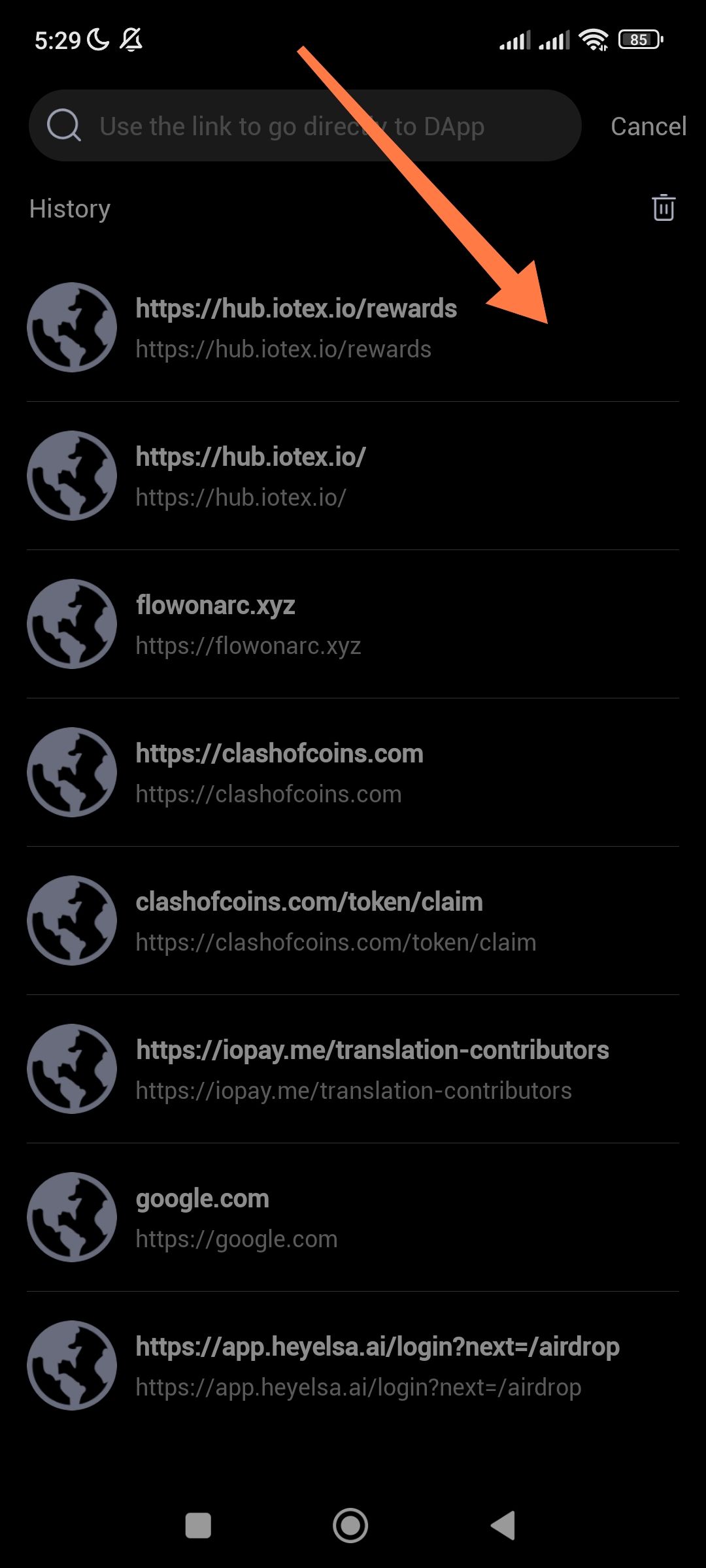
In the ioPay DApp browser history, there is currently no way to delete specific website entries. Long-pressing an item does not trigger a "delete" or "select" action. The only available option for history management is the "Clear All" (trash can icon), which forces users to wipe their entire history rather than removing individual links.
Environment:
App: ioPay Wallet
Feature: DApp Browser / History Management
Steps to Reproduce:
Open the ioPay app and tap the search/DApp browser bar.
View the "History" list.
Attempt to long-press or swipe on a specific history entry to delete it.
Observe that no context menu or "X" button appears.
Expected Result:
Users should have the ability to manage their privacy by deleting individual entries (via a long-press menu, a swipe-to-delete gesture, or an "edit" mode).
Actual Result:
There is no UI interaction to remove a single item. The user is only presented with a "Delete All" icon at the top right of the History section.
Requested Improvement:
Add a delete button or a long-press gesture to remove individual websites from the history list for better user control and privacy
Wallet Address: io1tkw393kejmxwnd454twc6020sxcyvh5dxqmren
Device & Environment:
-Operating system: Android 13
-Device model: Redmi Note 10 Pro
Log in to comment and vote
No comments yet
Be the first to share your thoughts.