[ECO Bounty] iopay Unable to Import NFTs in Wallet
Summary
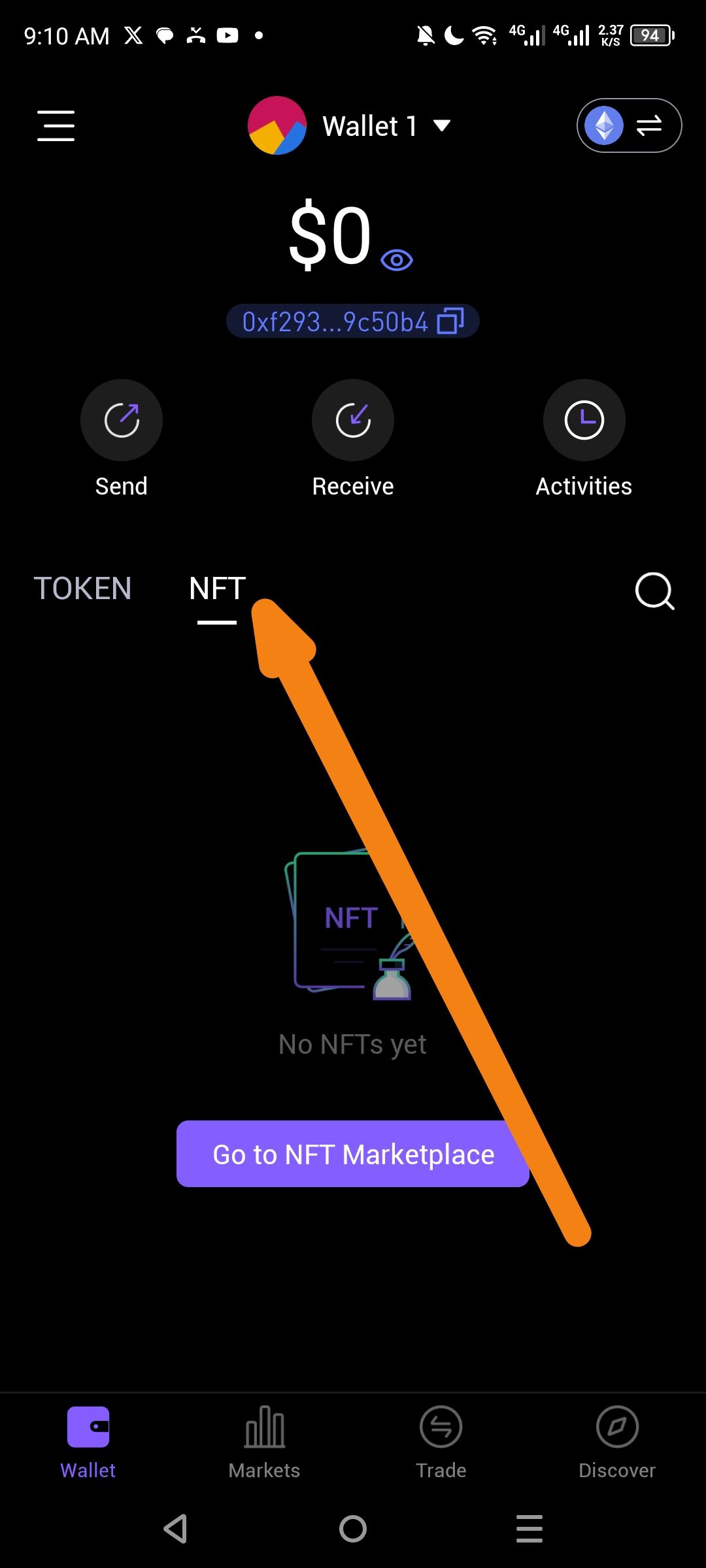
Users are unable to manually import NFTs within the dedicated "NFT" tab of the ioPay wallet, even when assets may exist on-chain. The interface shows "No NFTs yet" and lacks a direct "Import" button for manual entry.
Impact
Asset Inaccessibility: Users cannot manage, transfer, or view digital assets they own within the primary wallet interface.
High User Friction: Without a manual import feature (contract address + Token ID), users are forced to rely on automated indexing which may fail or delay.
Reduced Utility: The "Go to NFT Marketplace" button redirects users away from their private gallery, creating a disjointed user experience.
Steps to Reproduce
Open the ioPay app.
Navigate to the Wallet tab at the bottom left.
Tap on the NFT sub-tab.
Observe the empty state message: "No NFTs yet".
Search for a manual "Import" or "+" button to add an NFT via contract address (None found).
Wallet Address: io1tkw393kejmxwnd454twc6020sxcyvh5dxqmren
Device & Environment:
-Operating system: Android 13
-Device model: Redmi Note 10 Pro
Log in to comment and vote
No comments yet
Be the first to share your thoughts.