[Eco Bounty] IoTex Hub Balance Displays "NaN" value
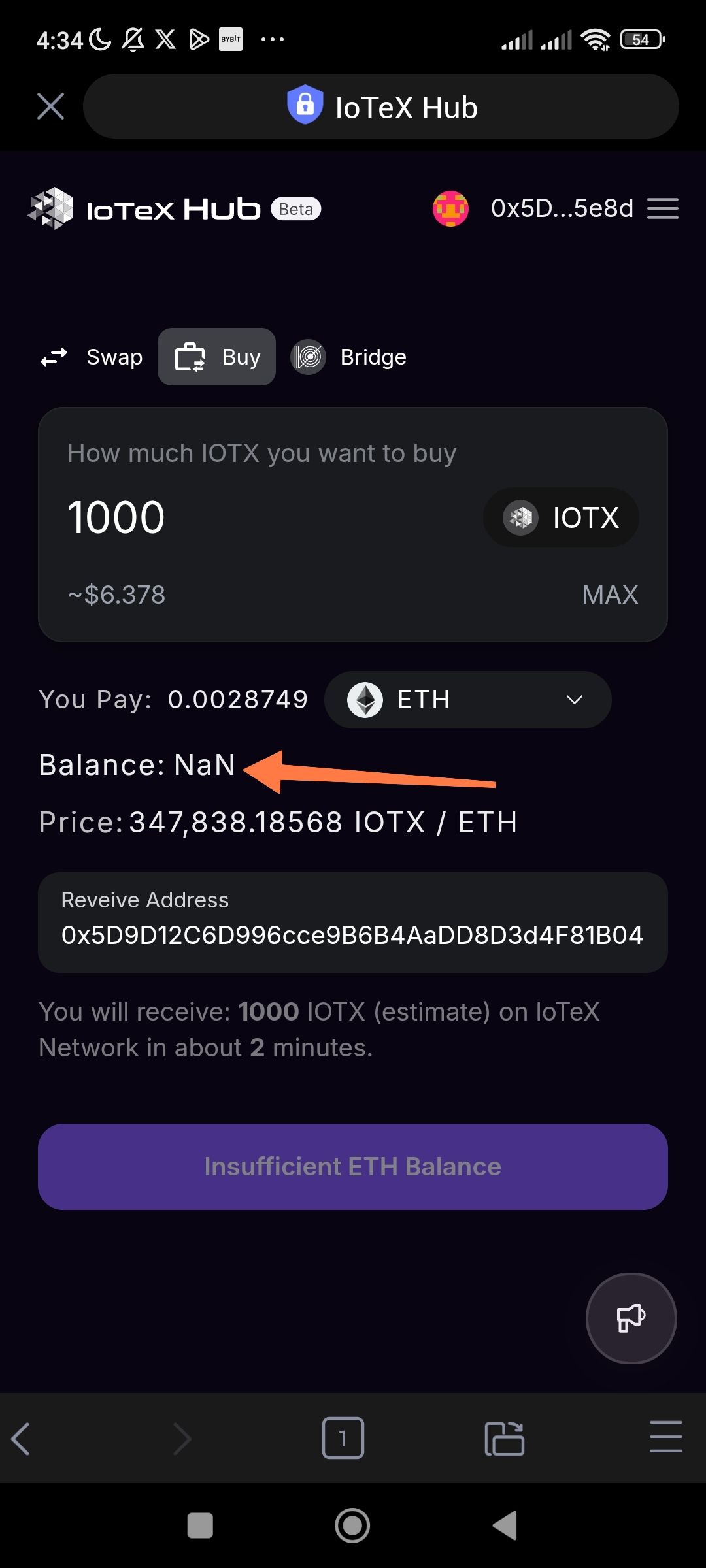
Wallet Balance field displays "NaN" instead of numerical value for ETH.
URL: hub.iotex.io/buy-iotx/crypto
Severity: High (Functional / Wallet Integration).
Description: On the Buy page, when a wallet is connected (as seen in the top right of the screenshot) and a token like ETH is selected to pay for IOTX, the "Balance" field displays "NaN". This indicates a failure in the calculation or fetching of the user's wallet balance, which prevents the user from knowing their available funds and triggers an "Insufficient ETH Balance" state on the action button.
Steps to Reproduce:
Navigate to hub.iotex.io/buy-iotx/crypto.
Connect a wallet (e.g., via the "Connect Wallet" button).
Select ETH as the "You Pay" token.
Input a numerical amount in the "How much IOTX you want to buy" field (e.g., 1000).
Observe the Balance: label below the token selector.
Expected Result: The balance field should display the actual amount of ETH held in the connected wallet (e.g., "Balance: 0.05 ETH").
Actual Result: The balance field displays "Balance: NaN".
Wallet Address: io1tkw393kejmxwnd454twc6020sxcyvh5dxqmren
Device & Environment:
-Operating system: Android 13
-Device model: Redmi Note 10 Pro
Log in to comment and vote
No comments yet
Be the first to share your thoughts.