[ECO Bounty] IoTeX Hub Functional Error
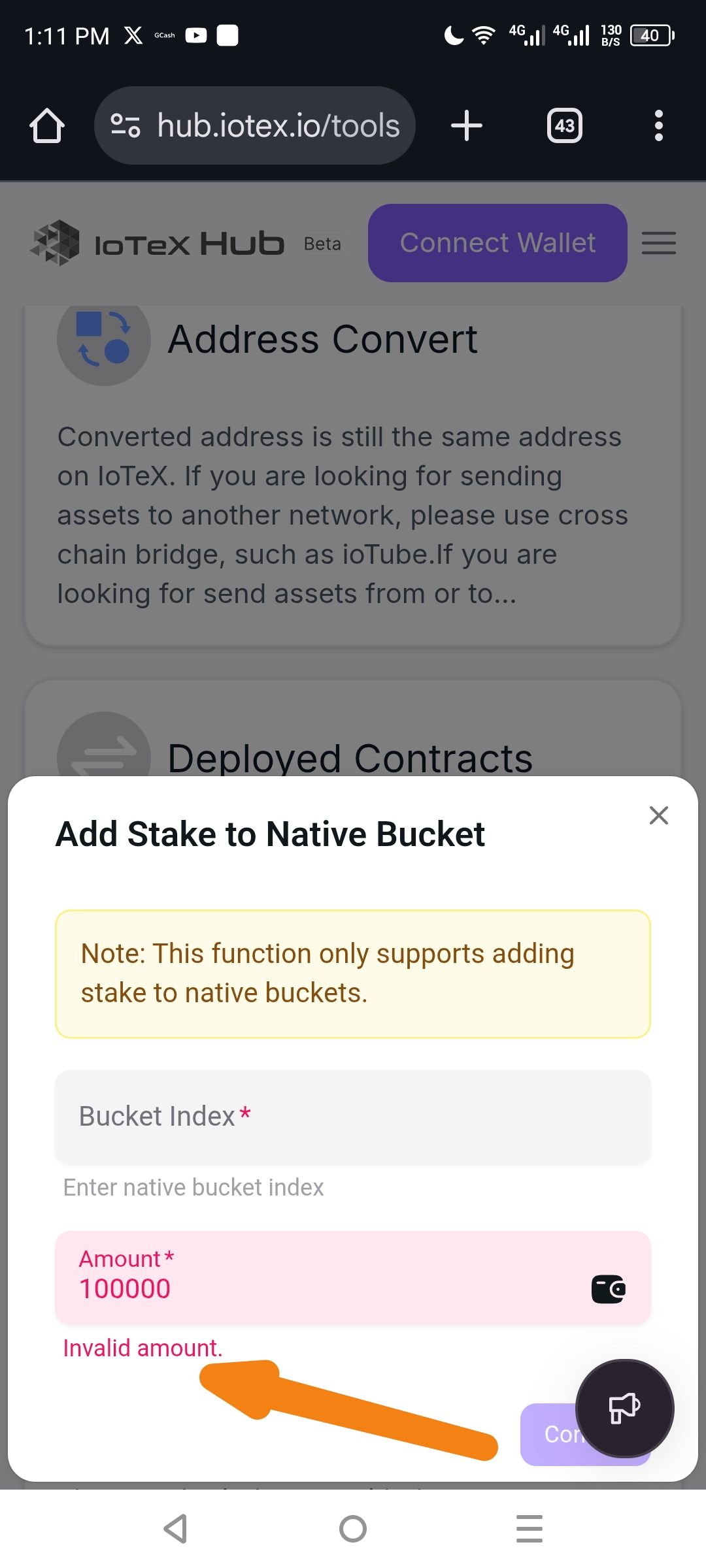
"Invalid amount" error persists in "Add Stake to Native Bucket" regardless of input
Severity
Critical (Blocks financial transactions/staking)
Environment
Platform: Mobile Web (Android)
Browser: Chrome Mobile
Wallet Status: Disconnected (as seen in the "Connect Wallet" button in the background)
Timestamp: 1:11 PM local time
Issue: Persistent "Invalid amount" Validation Error
Description
In the "Add Stake to Native Bucket" modal, the input field for "Amount" triggers an "Invalid amount" error message even when a standard numerical value (e.g., 100,000) is entered. This prevents the user from proceeding with the transaction.
Steps to Reproduce
Navigate to hub.iotex.io/tools.
Open the "Add Stake to Native Bucket" tool/modal.
Enter a valid numerical value in the Amount field (e.g.,
100000).Note that the input field turns red and the error message "Invalid amount." appears below it.
Expected Behavior
The system should validate the number and allow the user to proceed, provided the user has sufficient balance (or at least wait until the "Confirm" button is pressed to check balance).
Actual Behavior
The field immediately flags the input as invalid. This may be due to:
Wallet Not Connected: The system might be failing to validate because no wallet is connected to check against, but it is showing a "Value Error" instead of a "Connect Wallet" reminder.
Bucket Index Dependency: The error might be triggered because the "Bucket Index" field above it is empty, but the error message incorrectly points to the "Amount" field.
Suggested Fixes for Developers
Improved Error Messaging: If a wallet is not connected, the message should say "Please connect wallet" rather than "Invalid amount."
Field Dependencies: Ensure that the "Amount" validation doesn't fail simply because the "Bucket Index" hasn't been filled yet.
Wallet Address: io1tkw393kejmxwnd454twc6020sxcyvh5dxqmren
Device & Environment:
-Operating system: Android 13
-Device model: Redmi Note 10 Pro
Log in to comment and vote
No comments yet
Be the first to share your thoughts.