Description
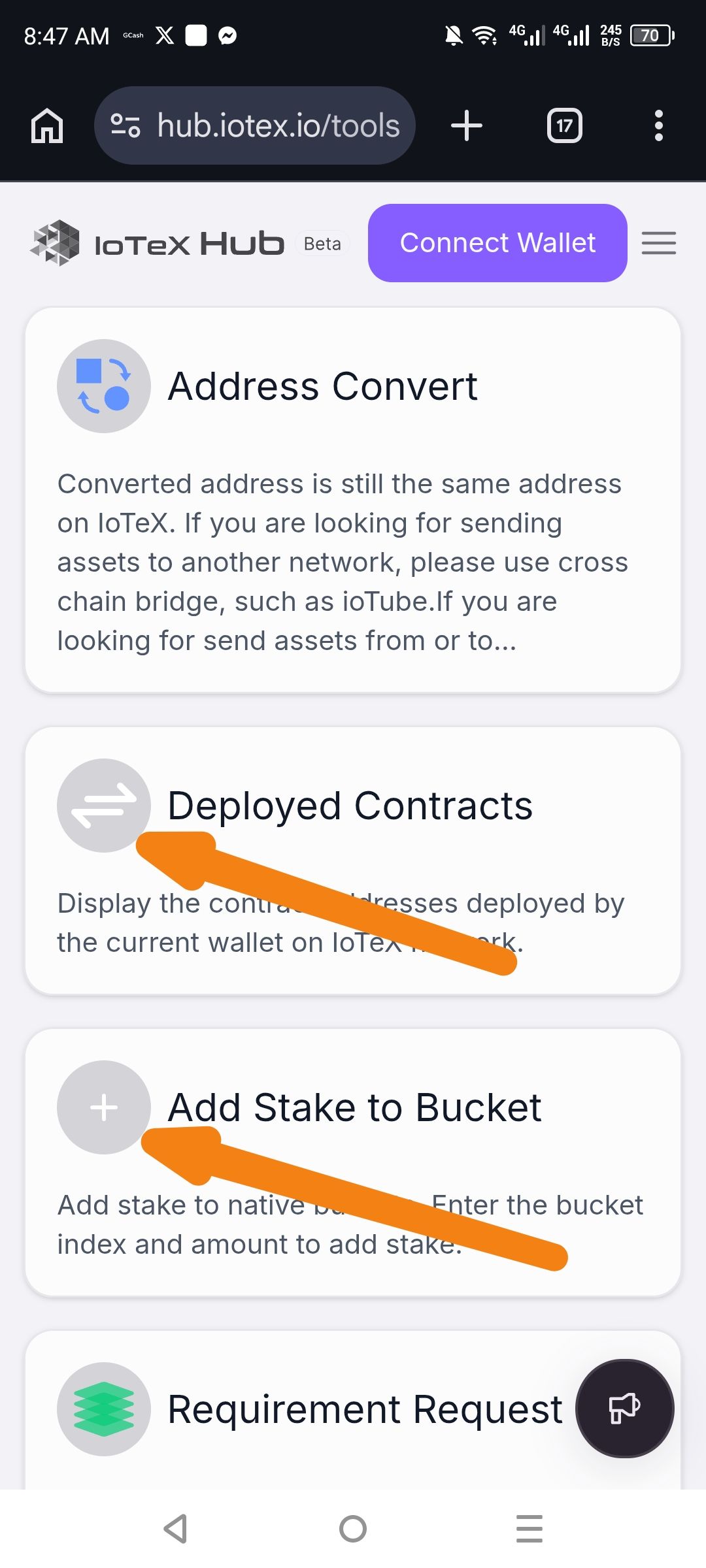
The "Tools" dashboard on the IoTeX Hub features an inconsistent color palette for its functional icons. While the "Address Convert" and "Requirement Request" icons utilize a multi-colored, branded theme, the icons for "Deployed Contracts" and "Add Stake to Bucket" are rendered in a flat, grayscale/monochrome style. This lack of color uniformity makes the interface appear incomplete or "Beta" in a way that may confuse users regarding which tools are active or fully developed.
Steps to Reproduce
Navigate to the IoTeX Hub Tools page.
Scroll through the available tool cards.
Compare the vibrant, blue/green icons of "Address Convert" and "Requirement Request" against the gray icons for "Deployed Contracts" and "Add Stake to Bucket".
Actual Result
The icons for "Deployed Contracts" and "Add Stake to Bucket" lack the color depth and branding seen in the other dashboard elements.
Expected Result
All tool icons should follow a consistent "modern style" color scheme to ensure a unified and professional user experience across the IoTeX Hub ecosystem.
Suggested Fix
Update the SVG or image assets for the grayscale icons to match the blue and green gradient theme used elsewhere on the page.
Wallet Address:
io1tkw393kejmxwnd454twc6020sxcyvh5dxqmren
Device & Environment:
-Operating system: Android 13
-Device model: Redmi Note 10 Pro
