[ECO Bounty] ioTex Hub Swap page “Route” icons don’t match the selected tokens
Description
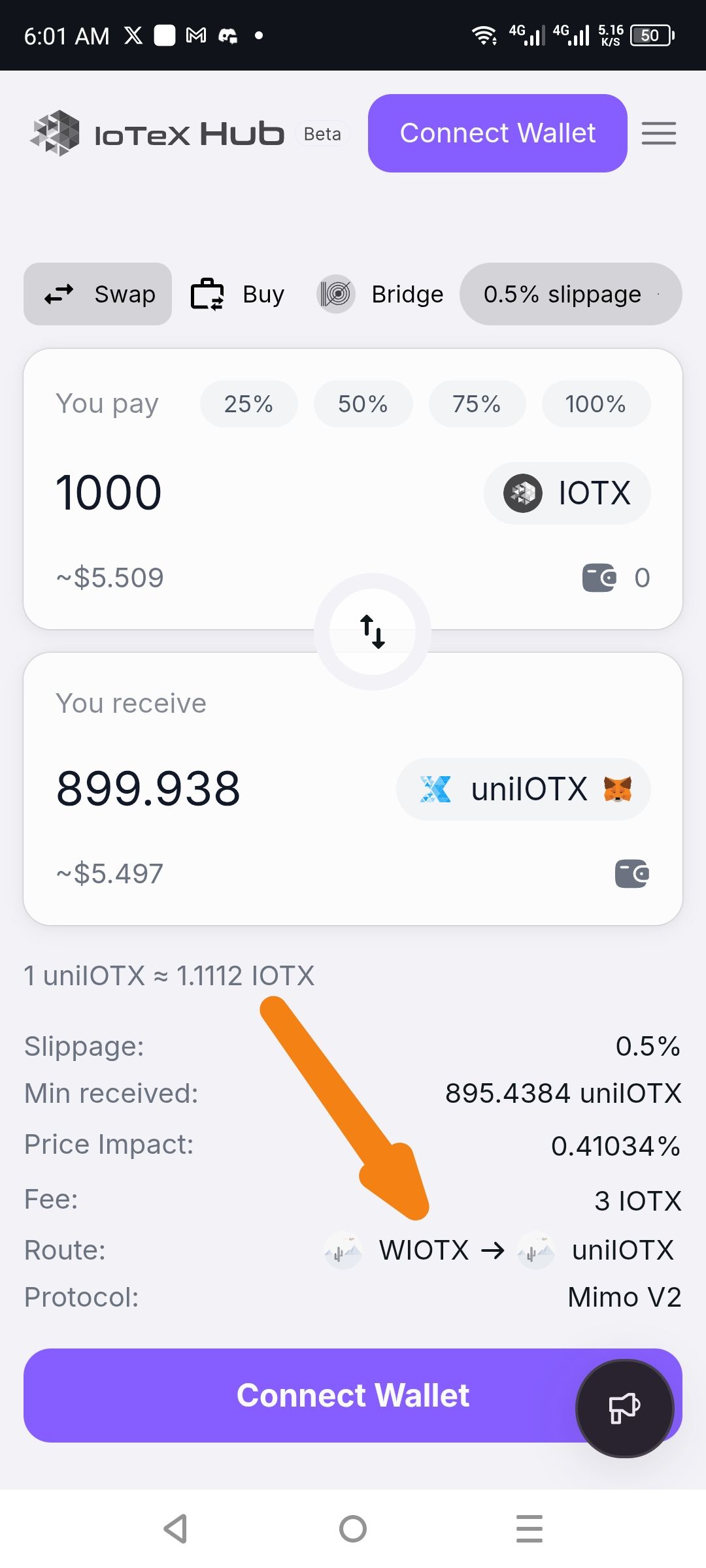
On the Swap screen, the “Route” section at the bottom is supposed to show the icons for each token in the path (e.g. IOTX → uniIOTX), but instead it renders generic placeholder images. This mismatch makes it hard to visually verify which tokens are being routed.
Steps to Reproduce
Open IoTeX Hub Beta on Android.
Tap “Swap” in the top navigation.
Enter 1,000 IOTX as the token you pay and select uniIOTX as the token you receive.
Observe the “Route” row below the price/fee details.
Expected Result
The route row displays the official IOTX logo, an arrow, then the uniIOTX logo.
Actual Result
Both token positions in the route row show a generic, gray placeholder icon rather than the correct token logos.
Wallet Address: io1tkw393kejmxwnd454twc6020sxcyvh5dxqmren
Device & Environment:
-Operating system: Android 13
-Device model: Redmi Note 10 Pro
Log in to comment and vote
No comments yet
Be the first to share your thoughts.