[Eco Bounty] IoTex Hub Trade Tooltip Icons Missing Helpful Information/Prompt
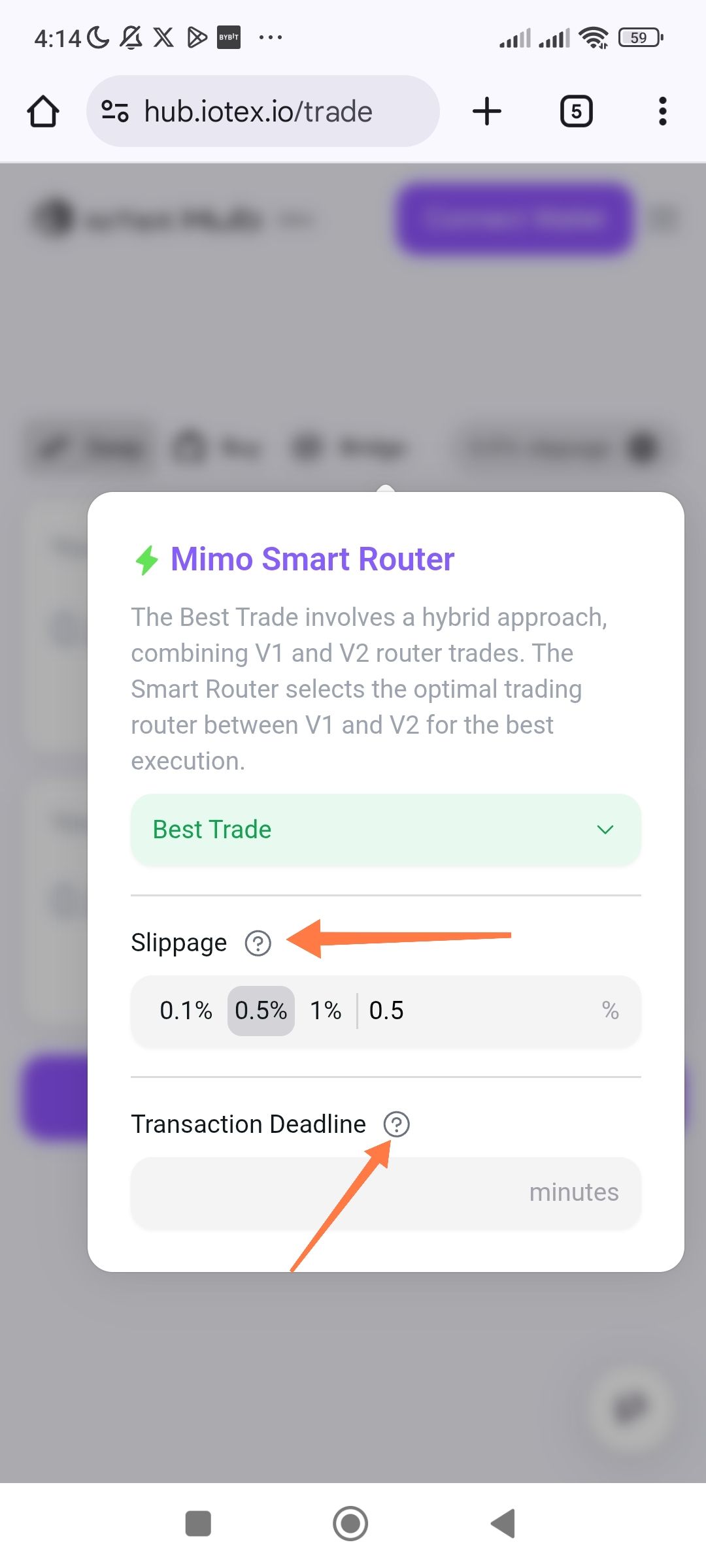
Tooltip icons ("?") for Slippage and Transaction Deadline do not trigger prompt/info messages.
URL: hub.iotex.io/trade
Severity: Medium (Usability / Information Accessibility).
Description: On the Trade page within the Mimo Smart Router settings modal, clicking or tapping on the help icons (question marks) next to "Slippage" and "Transaction Deadline" fails to display any explanatory text or prompt. These icons are intended to provide users with context on how these settings affect their trades, but they are currently non-functional.
Steps to Reproduce:
Navigate to hub.iotex.io/trade.
Open the trade settings modal (usually by clicking a gear icon or the smart router info).
Tap or click on the "?" icon next to the "Slippage" label.
Tap or click on the "?" icon next to the "Transaction Deadline" label.
Expected Result: A tooltip, popover, or prompt message should appear explaining what "Slippage" and "Transaction Deadline" mean and how they impact the transaction.
Actual Result: Nothing happens when clicking or tapping the icons. There is no visual feedback or information provided.
Wallet Address: io1tkw393kejmxwnd454twc6020sxcyvh5dxqmren
Device & Environment:
-Operating system: Android 13
-Device model: Redmi Note 10 Pro
Log in to comment and vote
No comments yet
Be the first to share your thoughts.