[Eco Bounty] IoTex Quicksilver UI Asset Redundancy – Double Avatar Display
Platform: Mobile Web (Android/Chrome)
URL: iotex.io/quicksilver
Severity: Low (Visual/UX Consistency)
1. Description
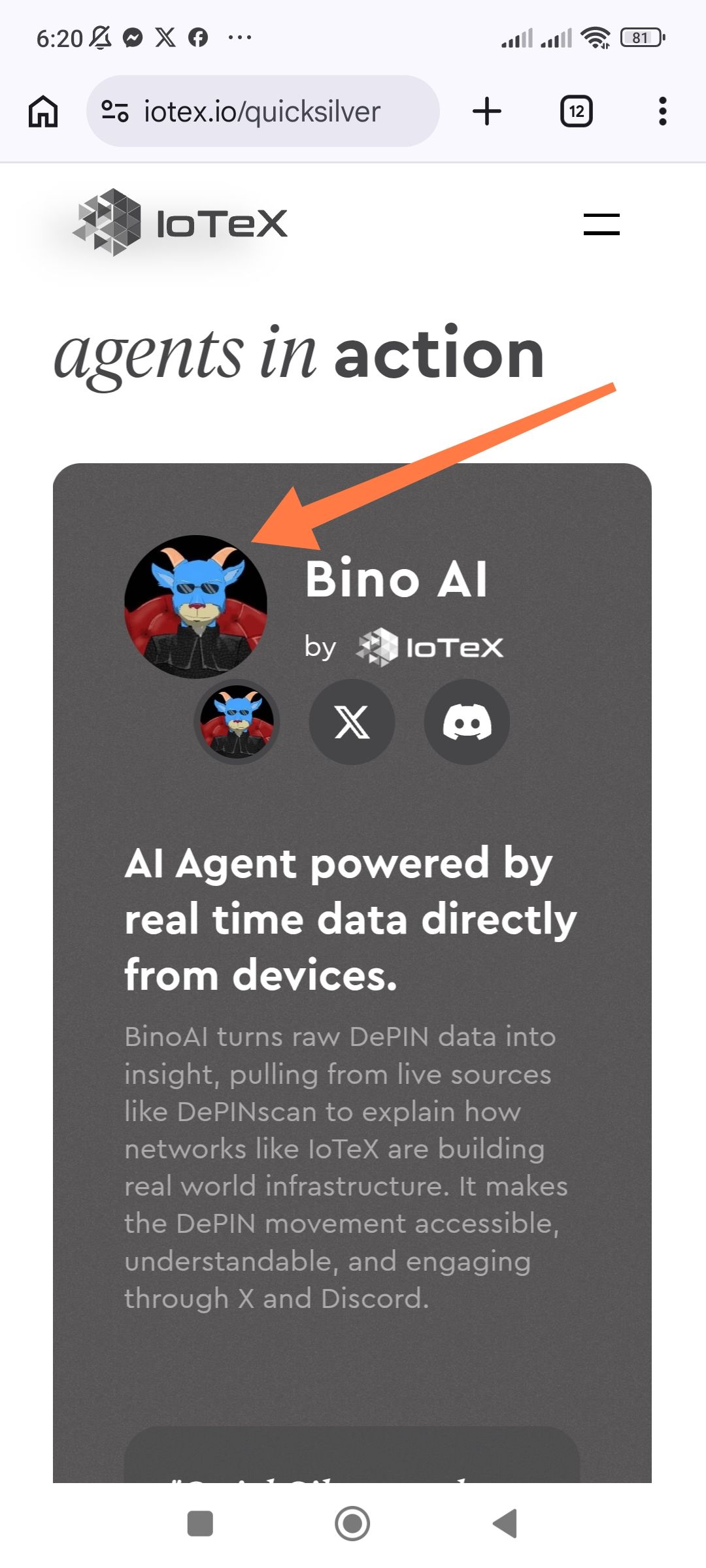
On the "Agents in Action" page, specifically within the Bino AI project card, there is a double avatar issue. The same project profile image is being rendered twice in immediate proximity: once as the primary large header avatar and a second time as a smaller thumbnail icon in the social links row.
2. Steps to Reproduce
Open a mobile browser (Chrome/Android).
Navigate to
https://iotex.io/quicksilver.Scroll to the "agents in action" section.
Observe the "Bino AI" card layout.
3. Expected Result
The UI should display the project avatar once as a primary identifier. The row containing the X (Twitter) and Discord icons should not include a redundant, smaller version of the same avatar.
4. Actual Result (The Issue)
Primary Avatar: Large circular image of the Bino AI mascot.
Secondary Avatar (Duplicate): A smaller version of the exact same mascot image is placed directly below the primary one, next to the social media buttons.
Visual Clutter: This duplication creates an "echo" effect that takes up valuable vertical and horizontal screen real estate on mobile devices.
5. Technical Observations
Data Binding Error: The component likely has two slots (
header_iconandinline_icon) that are both incorrectly mapped to the same image URL/asset ID for the Bino AI project.UI Hierarchy: Usually, the smaller slot is reserved for a "Developer/Team" logo or a "Verified" badge, but it is currently replicating the main project icon.
Wallet Address: io1tkw393kejmxwnd454twc6020sxcyvh5dxqmren
Device & Environment:
-Operating system: Android 13
-Device model: Redmi Note 10 Pro
Log in to comment and vote
No comments yet
Be the first to share your thoughts.