[ECO Bounty] IoTeX Website - "Physical AIs" Card UI/Text Clipping Issue
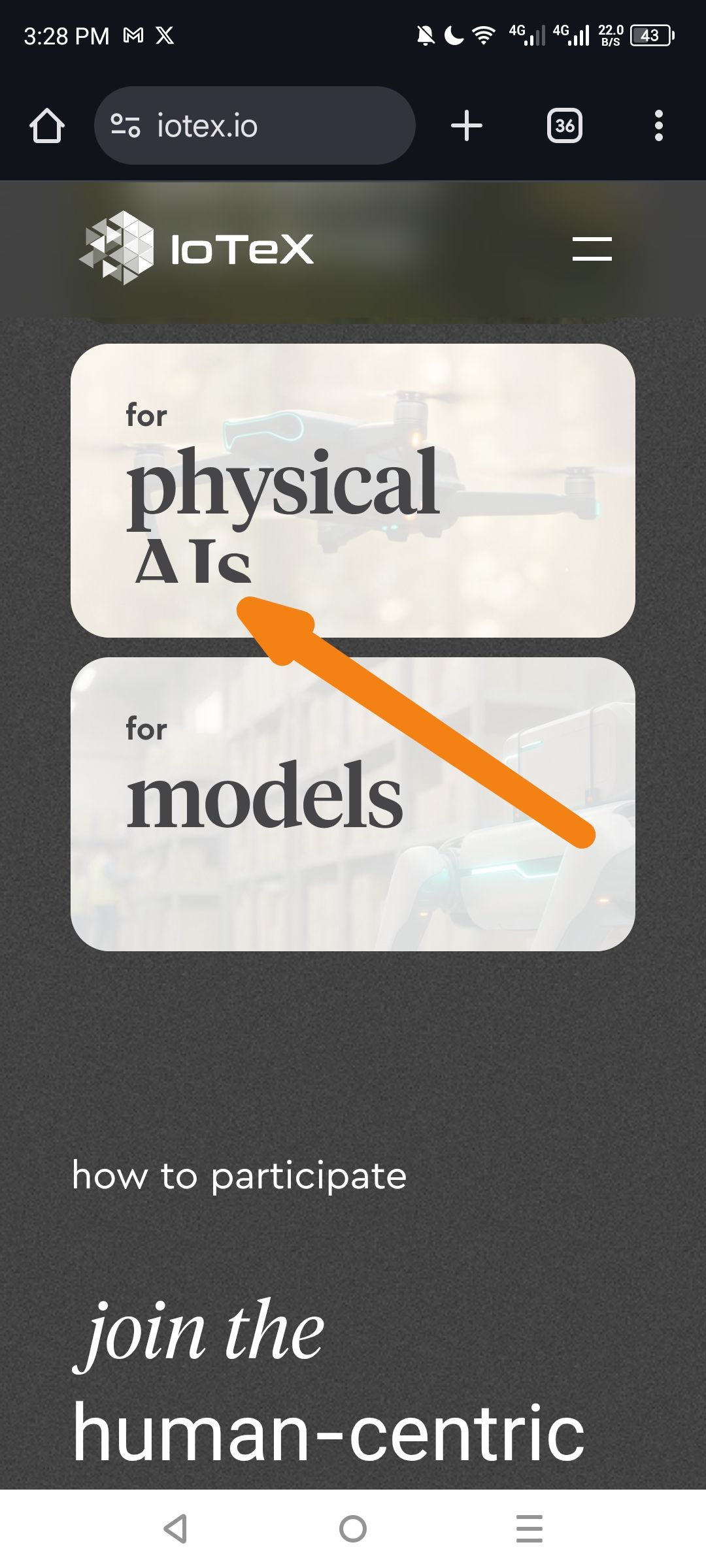
Severity: Medium (UI/Visual Design)
Description: The feature card labeled "for physical AIs" exhibits a UI rendering issue where the typography is not properly contained within the card boundaries. Specifically, the "s" in "AIs" appears to be either clipped at the bottom, suffering from poor font rendering, or positioned too close to the card edge, creating a visual defect that makes the text look broken or incomplete.
Steps to Reproduce:
Navigate to https://iotex.io/ on mobile device
Scroll to the feature cards section (showing "for physical AIs" and "for models")
Observe the first card's typography rendering
Expected Result:
Text should be fully visible within card boundaries with proper padding
All characters should render clearly without clipping or truncation
Consistent spacing between text and card edges
Actual Result:
The text "AIs" appears to overflow or get cut off at the bottom edge of the card
The "s" character may be partially obscured or rendered with improper baseline alignment
Insufficient padding between text and card container bottom edge
Environment:
Platform: Mobile (Android)
Browser: Chrome Mobile
Viewport: Portrait mode
Date Observed: February 9, 2026
Suggested Fix:
Increase card padding: Add
padding-bottomto ensure text doesn't touch card edgesAdjust line-height: Reduce line-height or font-size to prevent descenders (like the tail of "s") from being clipped
Check container overflow: Ensure
overflow: hiddenisn't clipping the text, or change tooverflow: visiblewith proper spacingFont metrics: Verify the webfont's descender metrics aren't causing the "s" to be cut off
Wallet Address: io1tkw393kejmxwnd454twc6020sxcyvh5dxqmren
Device & Environment:
-Operating system: Android 13
-Device model: Redmi Note 10 Pro
Log in to comment and vote
No comments yet
Be the first to share your thoughts.