[Eco Bounty] IoTeXScan Charts & Statistics Loading Issues
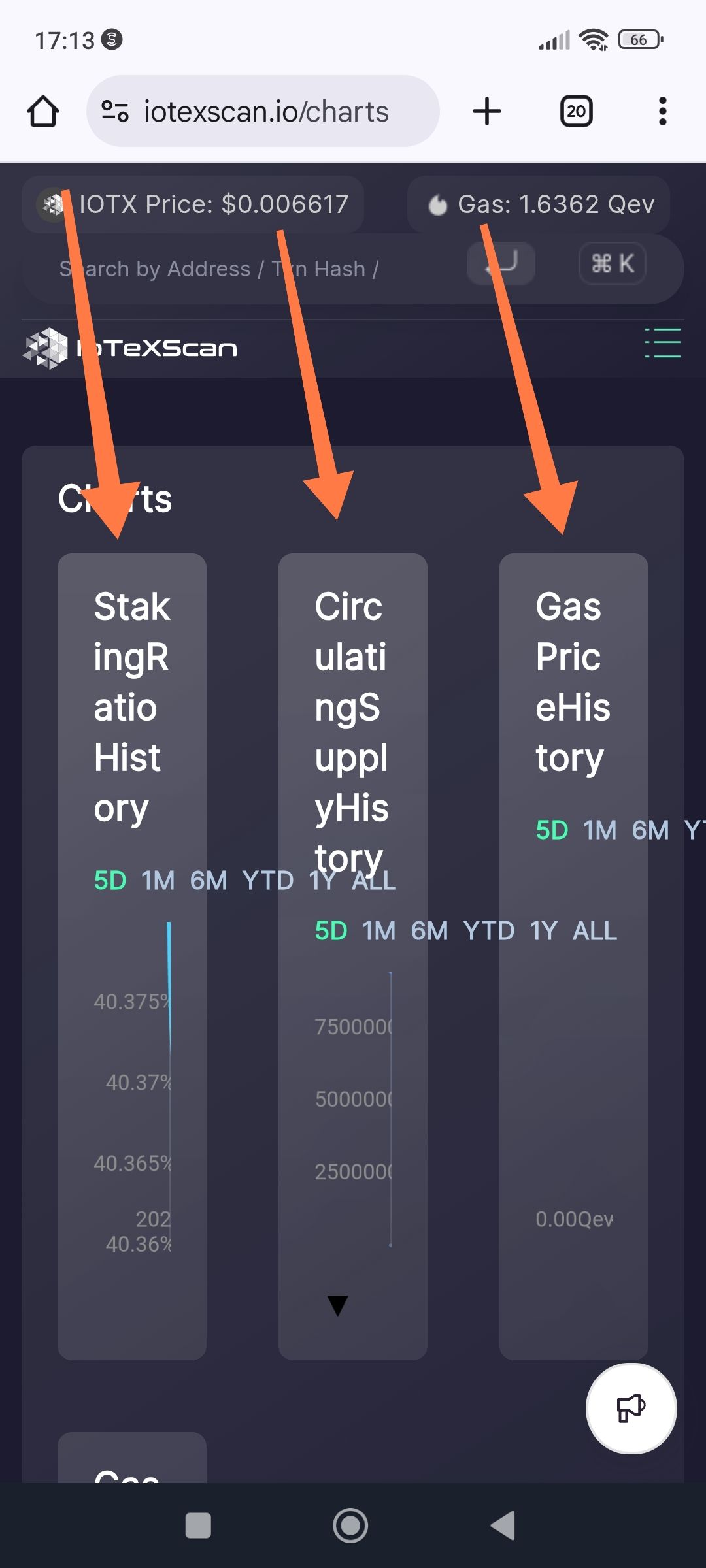
Description
When accessing the Charts & Statistics page on IoTeXScan via a mobile browser, several key data visualizations (such as "Daily Transactions Chart" or "Daily Token Transfer Chart") fail to render or experience significant delays. Some statistic blocks appear empty or show placeholder "loading" states indefinitely.
Steps to Reproduce
Open a mobile browser and navigate to iotexscan.io.
Tap the Menu icon (three horizontal lines) in the top right.
Select Resources > Charts & Stats.
Scroll through the page to view different charts like "Daily Transactions" and "Supply Growth."
Expected Result
All charts should load within a reasonable timeframe (under 3 seconds) and display accurate, interactive data points representing the current state of the IoTeX blockchain.
Actual Result
The page structure loads, but individual chart containers remain blank or display a "spinning" loading icon.
Statistical summaries (e.g., Total Transactions, Staked IOTX) show inconsistent data or "0" before eventually updating.
Wallet Address: io1tkw393kejmxwnd454twc6020sxcyvh5dxqmren
Device & Environment:
-Operating system: Android 13
-Device model: Redmi Note 10 Pro
Log in to comment and vote
No comments yet
Be the first to share your thoughts.