Wallet Address Reporter: io1tkw393kejmxwnd454twc6020sxcyvh5dxqmren
App Version: ioPay v5.3.1 (3973)
Device: Redmi Note 10 Pro (Android 13)
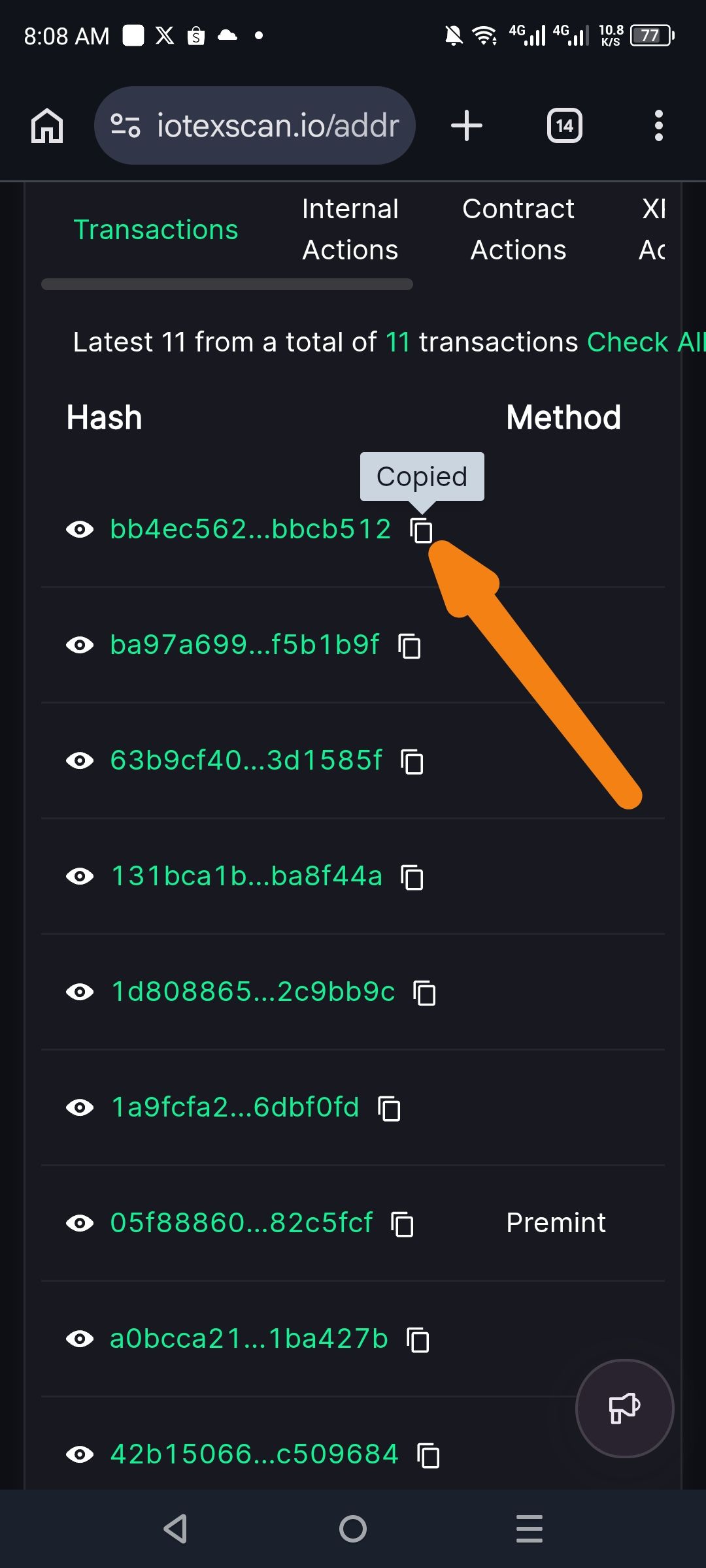
Description
The current implementation of the "Copy" function on IoTeXScan lacks sufficient visual cues to confirm a successful action. While a small "Copied" tooltip appears briefly above the icon, the icon itself does not change color, nor does it swap to a "check-mark" state. This lack of state-change feedback can lead to user uncertainty, especially on mobile devices where tooltips may be obscured by the user's thumb.
Steps to Reproduce
Navigate to a transaction list on iotexscan.io.
Click the Copy icon (double-square) next to any transaction Hash.
Observe the visual state of the icon and the surrounding UI.
Actual Result
A temporary "Copied" tooltip appears, but the icon remains static in its original color and shape.
Expected Result
The UI should provide clear, multi-layered feedback:
Icon State Change: The copy icon should briefly change to a green check-mark or change color to indicate success.
Persistent Tooltip: The tooltip should have higher contrast to be easily visible against the dark background.
