[ECO Bounty] ioTexScan Missing Sidebar Icons & Weak Visual Feedback
Wallet Address Reporter: io1tkw393kejmxwnd454twc6020sxcyvh5dxqmren
App Version: ioPay v5.4.0 (3974)
Device: Redmi Note 10 Pro (Android 13)
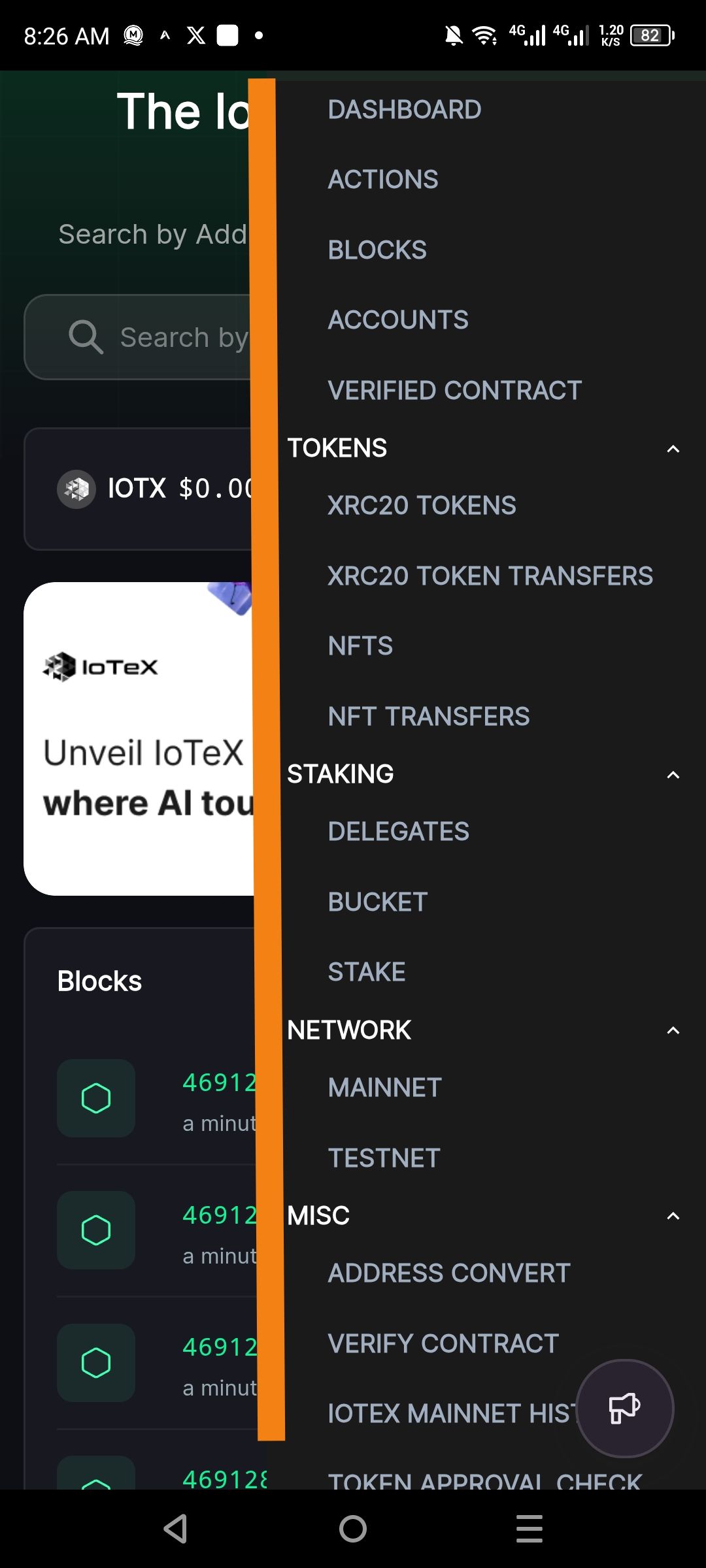
Description
The side navigation menu on IoTeXScan utilizes a purely text-based list for its core categories (e.g., DASHBOARD, ACTIONS, BLOCKS, TOKENS, STAKING). There are no accompanying Icons to provide a visual "anchor" for each section.
In complex block explorers, icons are critical for "glanceability," allowing users to quickly distinguish between technical categories (like Blocks vs. Staking) without reading every line of text. Furthermore, the menu lacks strong visual feedback (such as a distinct highlight or icon color change) to indicate which section is currently active, potentially causing navigation confusion for mobile users.
Steps to Reproduce
Navigate to iotexscan.io on a mobile device.
Open the sidebar menu by tapping the "hamburger" icon.
Review the menu items under DASHBOARD, TOKENS, STAKING, etc..
Note the absence of any leading icons or visual status indicators for active categories.
Actual Result
The menu presents as a plain text list with no visual iconography or persistent status cues.
Expected Result
Each primary category should have a unique, descriptive Icon (e.g., a cube for Blocks, a coin for Tokens, a shield for Staking) to improve accessibility and visual hierarchy.
Log in to comment and vote
No comments yet
Be the first to share your thoughts.