[ECO Bounty] ioTube Lack of Persistent Visual Feedback for Copy Action
Wallet Address Reporter: io1tkw393kejmxwnd454twc6020sxcyvh5dxqmren
App Version: ioPay v5.3.1 (3973)
Device: Redmi Note 10 Pro (Android 13)
Description
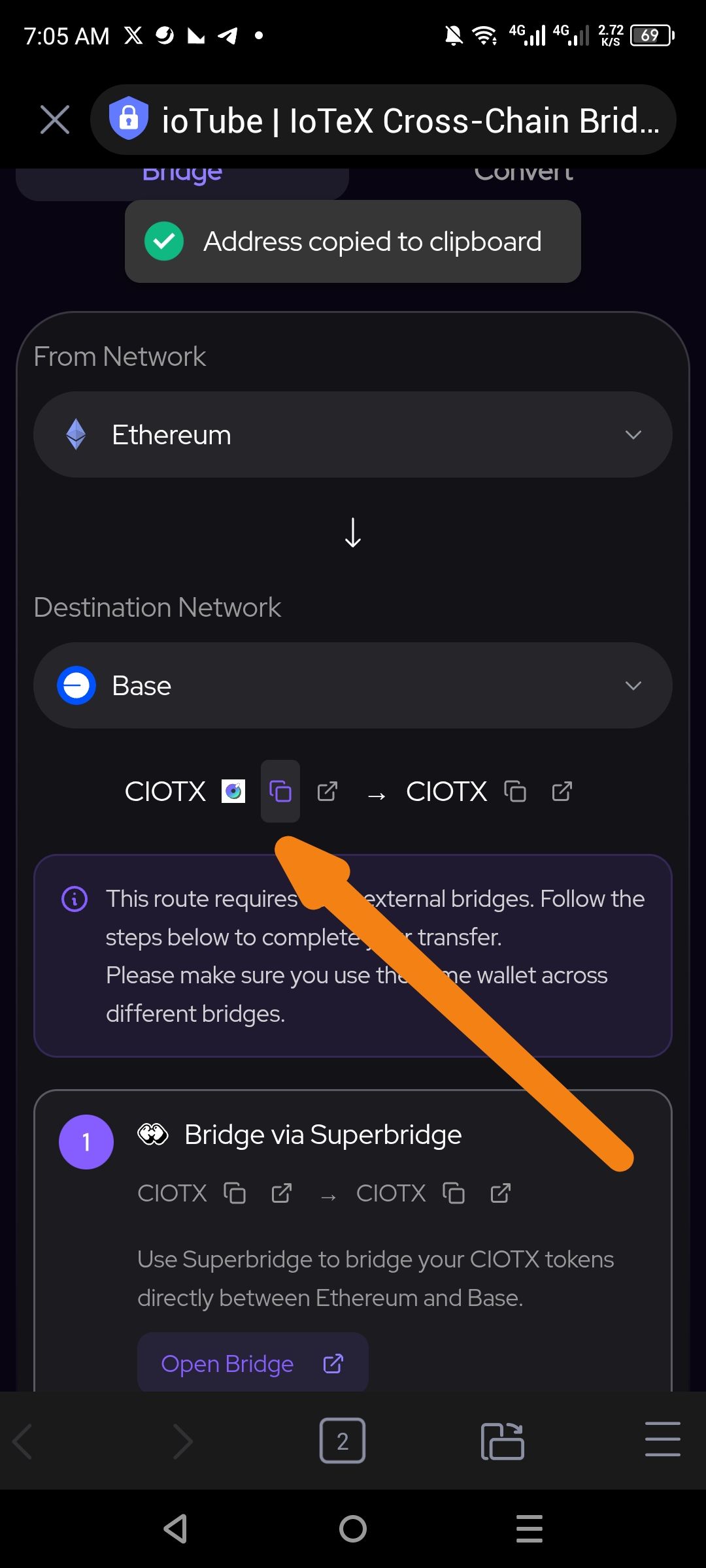
In the ioTube bridge interface, the copy icon (overlapping squares) does not change its visual state (e.g., transforming into a checkmark) after being clicked. While a temporary toast notification ("Address copied to clipboard") appears at the top of the screen, the icon itself remains static.
This lack of local, persistent feedback on the interacted element forces the user to look away from their current point of focus to confirm the action, leading to a fragmented user experience. This is particularly problematic in a bridge environment where verifying correct addresses is critical for fund safety.
Steps to Reproduce
Open the ioPay app and launch the ioTube bridge dApp.
Set up a bridge route (e.g., Ethereum to Base).
Click the Copy icon next to a token address (e.g., CIOTX).
Observe the state of the icon immediately after clicking.
Actual Result
The icon remains unchanged. Only a temporary top-level toast message provides confirmation.
Expected Result
The copy icon should temporarily or persistently transform into a green checkmark (or similar "Success" indicator) to provide immediate, localized confirmation that the address is now on the clipboard.
Log in to comment and vote
No comments yet
Be the first to share your thoughts.