[ECO Bounty] ioTube Missing Token Images in "Select Token" List
Wallet Address Reporter: io1tkw393kejmxwnd454twc6020sxcyvh5dxqmren
App Version: ioPay v5.3.1 (3973)
Device: Redmi Note 10 Pro (Android 13)
Description
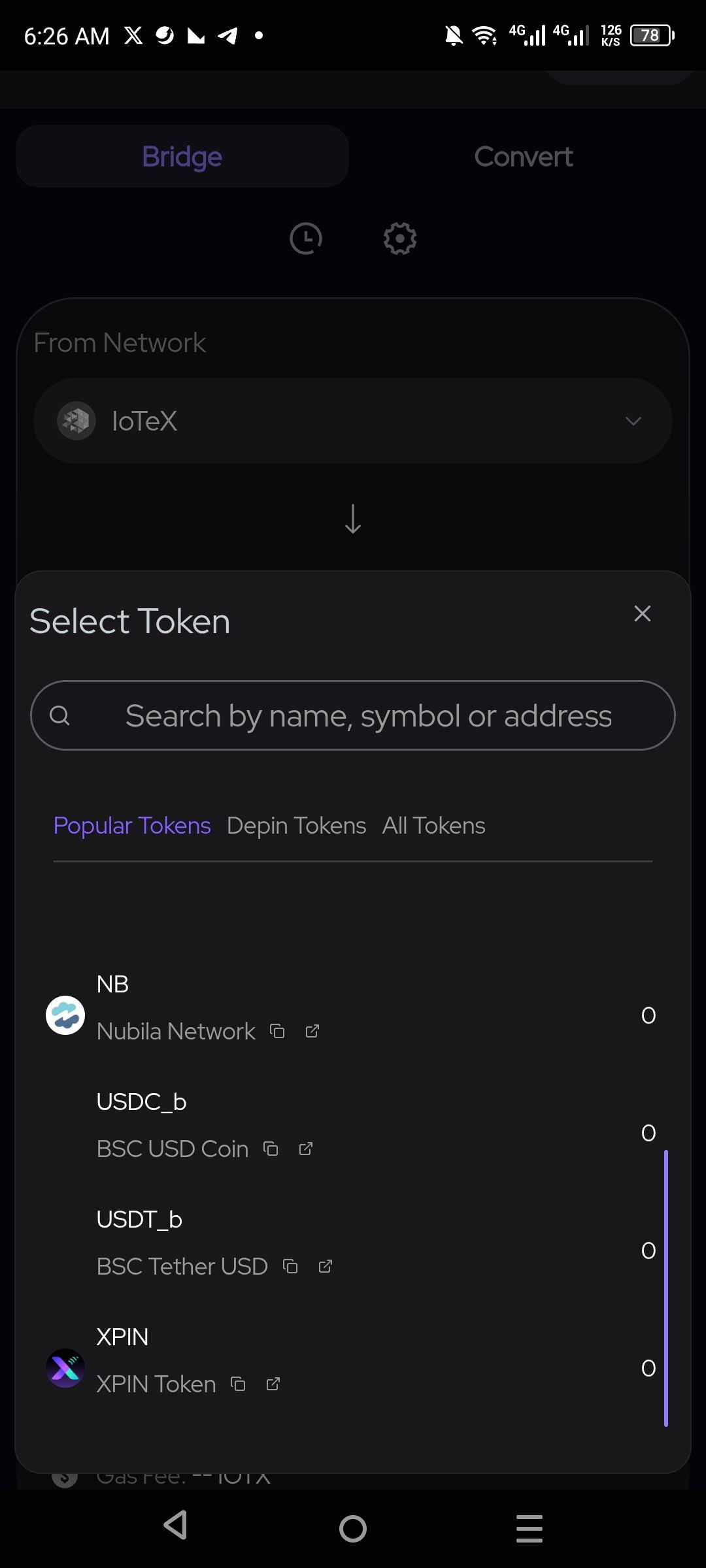
In the ioTube bridge interface, when a user accesses the "Select Token" modal to choose an asset, the visual icons for several popular tokens are not loading correctly. Specifically, prominent tokens such as USDC_b (BSC USD Coin) and USDT_b (BSC Tether USD) are missing their respective branded images, leaving only empty placeholders. The absence of these icons reduces the intuitive "at-a-glance" recognition expected in a cross-chain bridging application, potentially slowing down the user workflow.
Steps to Reproduce
Open the ioPay app and navigate to the Discover tab.
Launch the ioTube bridge dApp.
Click on the token selector element (typically a "Select Token" or current asset name).
Scroll through the resulting "Select Token" modal and observe the image fields for USDC_b and USDT_b.
Actual Result
The list is populated with token names and network identifiers, but the image containers for USDC_b and USDT_b are empty, failing to display the corresponding token logos.
Expected Result
Every token listed in the "Select Token" modal must be accompanied by its specific branded logo (e.g., the standard USDC blue icon for USDC_b) to aid in rapid and reliable asset identification.
Log in to comment and vote
No comments yet
Be the first to share your thoughts.