[ECO Bounty] ioTube Wallet Connection & Address Sync Issue
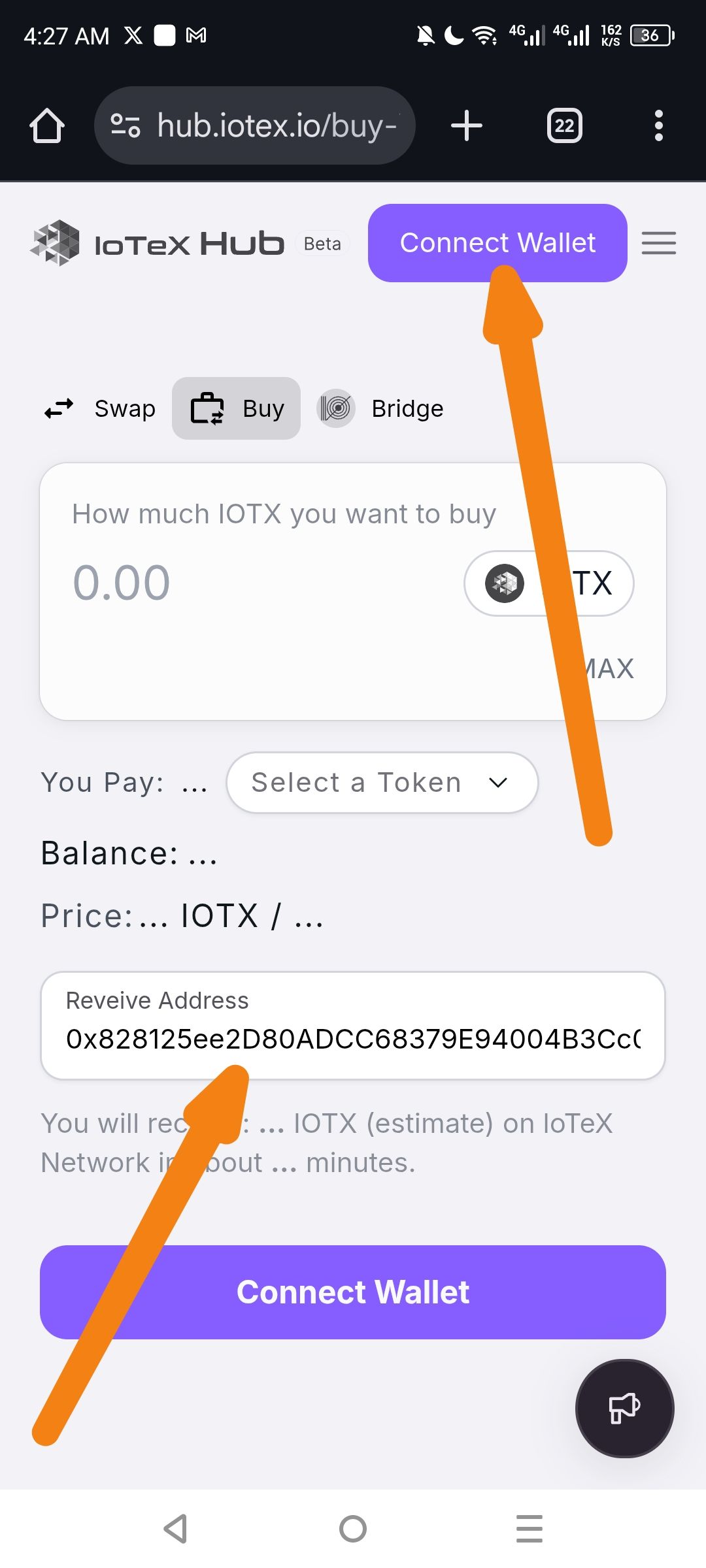
Bug Report: IoTube Buy Page Issue
Conversation with Gemini
Create Bug Report ioTube issue when you click the Buy
Based on the video and screenshot provided, it appears there is a functional or UI issue on the IoTeX Hub "Buy" page where the wallet connection and address population are not syncing as expected.
Below is a structured bug report you can use to submit this issue to the IoTeX team via their Official Discord (Support Ticket) or by emailing support@iotex.io.
Bug Report: Wallet Connection & Address Sync Issue
Product: IoTeX Hub (hub.iotex.io)
Section: Buy Page
Device: Android / Mobile Browser (Chrome)
Date of Discovery: February 6, 2026
1. Summary
The "Buy" interface fails to recognize a connected wallet status correctly. Despite an address being displayed in the "Receive Address" field, the page continues to display "Connect Wallet" prompts both in the header and as the primary action button.
2. Steps to Reproduce
Navigate to
hub.iotex.ioon a mobile browser.Select the Buy tab.
Attempt to connect a wallet (or observe the state if previously connected).
Observe that the "Receive Address" field is populated (e.g.,
0x8281...B3Cc), but the UI still requires a wallet connection to proceed.
3. Expected Result
If an address is populated and the wallet is linked, the "Connect Wallet" button should change to "Buy Now" or "Proceed," and the header should reflect a "Connected" state.
4. Actual Result
Header: Shows "Connect Wallet" button (orange arrow in screenshot).
Action Button: Bottom button remains as "Connect Wallet."
Address Field: Shows
0x828125ee2D80ADCC68379E94004B3Cc..., indicating the app has retrieved the address but has not transitioned the app state to "Connected."Typo Noted: The label for the address field is misspelled as "Reveive Address" instead of "Receive Address."
5. Visual Evidence
Screenshot:
Screenshot_20260206-042807.jpg(Highlights the disconnect between the populated address and the "Connect Wallet" prompt).Video:
Screen_Recording_20260206_042733.mp4(Shows the user interaction and the failure of the button to update).
Wallet Address: io1tkw393kejmxwnd454twc6020sxcyvh5dxqmren
Device & Environment:
-Operating system: Android 13
-Device model: Redmi Note 10 Pro
Log in to comment and vote
No comments yet
Be the first to share your thoughts.