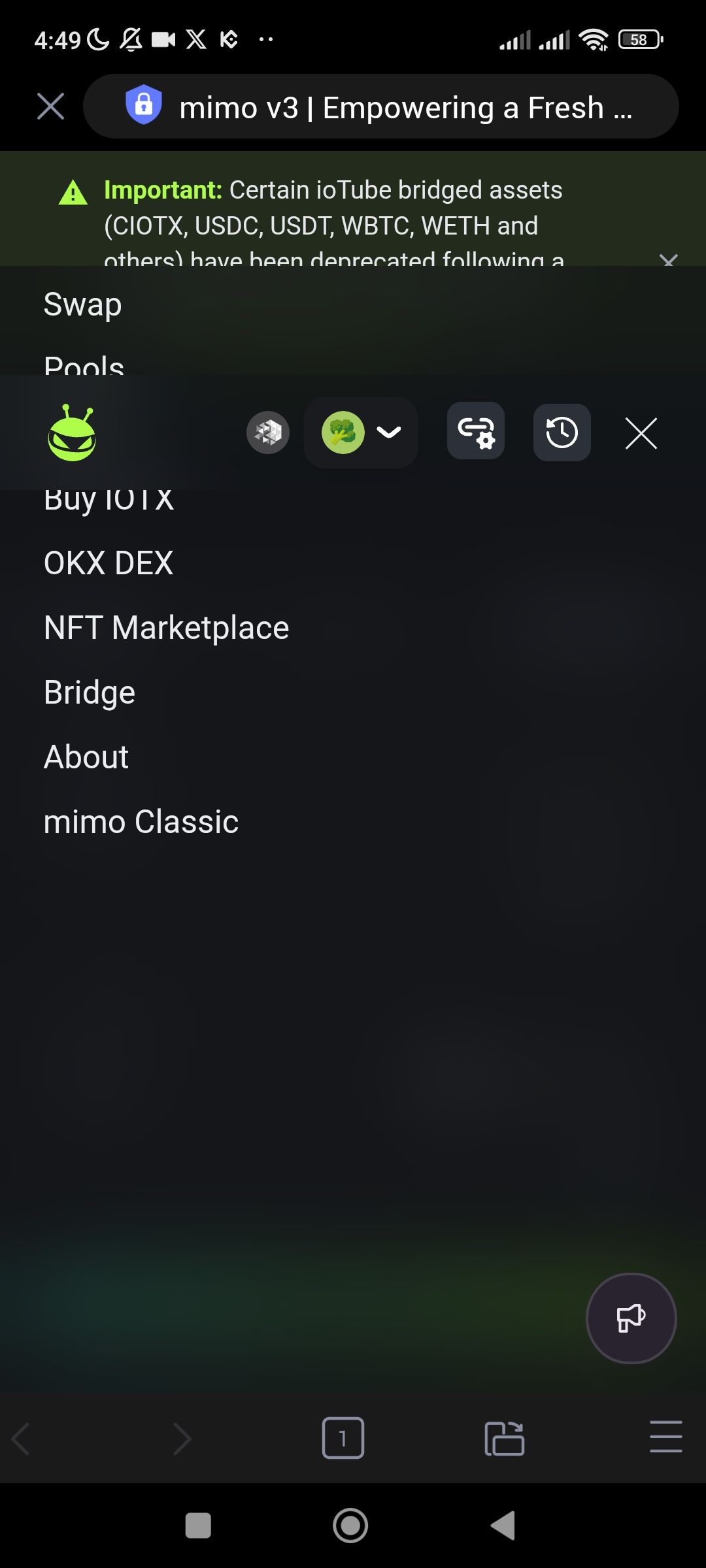
1. Description
When clicking the hamburger menu on the right side of the header in the mimo v3 mobile interface, the menu overlay displays significant formatting and layer issues:
Background Transparency: The menu background is fully transparent or dark, causing the menu text (e.g., "Swap," "Pools," "Bridge") to blend into the main app background, making it difficult to read.
UI Clipping: The menu appears to be "cut off" at the top, with the "Important" notice banner overlapping or sitting awkwardly behind the first menu items.
Sticky Header Conflict: The wallet address and network icons remain visible and layered incorrectly over the menu options.
2. Steps to Reproduce
Open mimo v3 in the ioPay mobile browser.
Click the hamburger menu icon (two horizontal lines) located in the top right corner.
Observe that the menu opens but fails to provide a solid background or a clear "Close" (X) transition that is easily distinguishable from the rest of the UI.
3. Actual Result
The menu opens as a transparent overlay where the menu items are barely readable against the DApp's background elements. The layout appears "broken" because the header icons and the notification banner do not clear properly when the menu is active.
4. Expected Result
The menu should open as a solid, high-contrast overlay that completely covers or dims the background content to ensure readability. Navigation items should be clearly separated from header icons.
### Suggested Fixes
Overlay Opacity: Increase the opacity of the
.menu-overlaybackground to1.0or add a high-blur backdrop filter to separate the menu from the Swap interface.Z-Index Correction: Adjust the
z-indexof the navigation menu so it sits above the "Important" notice banner and the wallet/network icons.Close Button Logic: Ensure the "X" button replaces the hamburger icon clearly and has enough padding to prevent accidental clicks on the icons behind it.
Wallet Address: io1tkw393kejmxwnd454twc6020sxcyvh5dxqmren
Device & Environment:
-Operating system: Android 13
-Device model: Redmi Note 10 Pro
