[ECO Bounty] mimo Exchange Improper Slippage Validation and UI Overflow

Description
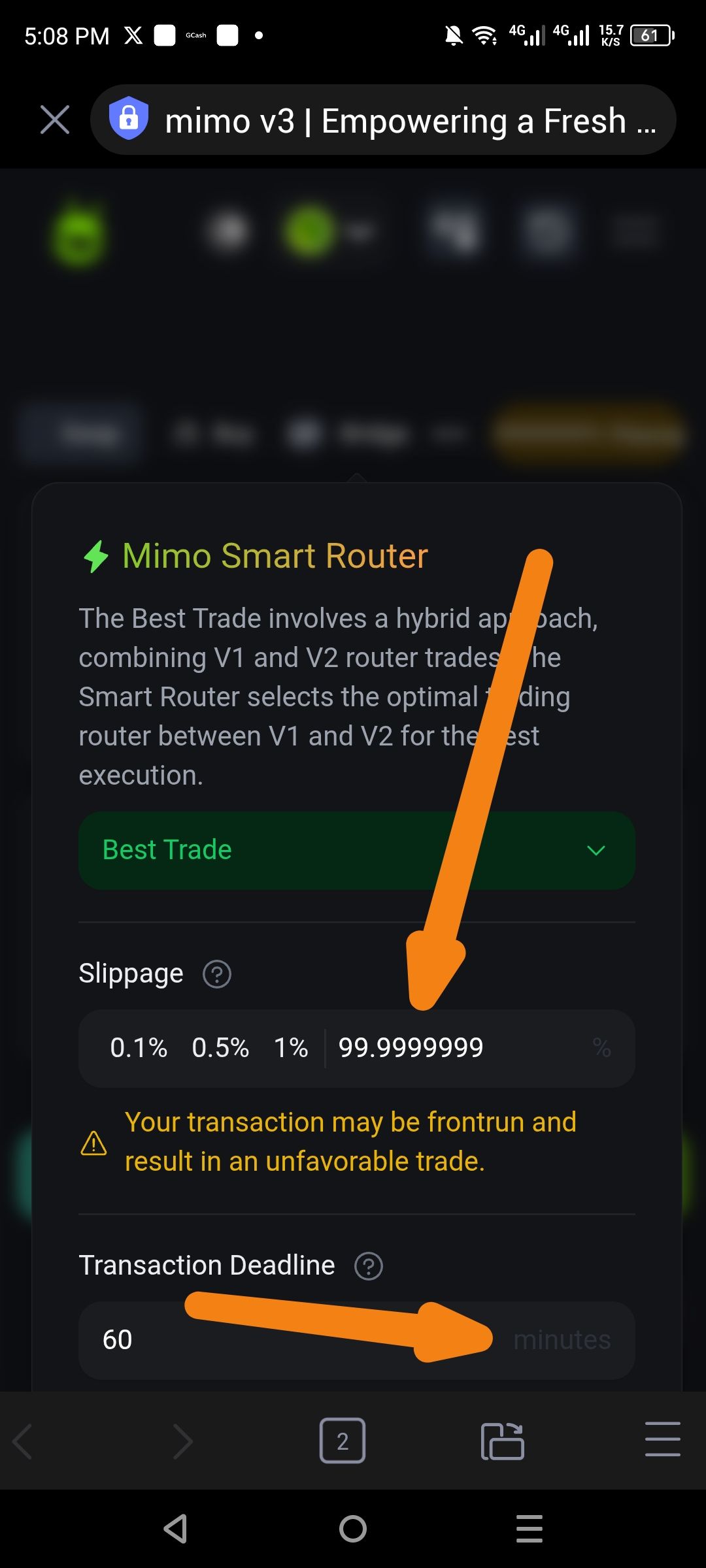
The exchange settings allow users to input extreme slippage values (e.g., 99.9999999%) without a reasonable cap or rounding. This causes significant UI breakage on the main swap interface. Additionally, the "Transaction Deadline" input lacks visual clarity for its unit label.
Severity
High – Allowing nearly 100% slippage poses a severe financial risk to users (front-running/total loss of value), and the resulting UI overflow obscures critical navigation elements.
Impact
Financial Risk: Users can inadvertently set slippage that guarantees an unfavorable trade.
UI/UX: Long decimal strings overflow their containers, cutting off text like the "Slippage" label on the main dashboard.
Accessibility: The "minutes" label in the Transaction Deadline field has poor contrast, making it difficult to read.
Reproduce
Navigate to the Swap settings/Slippage configuration.
Input a value with many decimals or a value exceeding 50% (e.g.,
99.9999999).Note that the system accepts the value and displays a warning but does not block the input.
Return to the main Swap screen and observe the slippage display at the top right.
Observe the Transaction Deadline input field and the visibility of the "minutes" text.
Expectation
Slippage: Should be capped at a maximum (e.g., 50%) or require a secondary "confirm" for extreme values. Decimal places should be truncated or rounded.
Design: The slippage badge on the main screen should have a maximum width or handle long strings with ellipsis to prevent layout breaking.
Clarity: The "minutes" label should be clearly legible against the dark background.
Actual
Slippage: Accepts 99.9999999%, which breaks the header layout on the main page.
Minutes: The "minutes" text inside the input box is very dark and nearly invisible against the field background.
Suggest Fix
Validation: Implement a hard cap on slippage (e.g., 50%) and limit decimal input to 2 places.
CSS Fix: Add
overflow: hidden; text-overflow: ellipsis;to the slippage badge on the main swap interface.Contrast: Increase the brightness/opacity of the "minutes" label in the Transaction Deadline field to meet WCAG accessibility standards.
Wallet Address: io1tkw393kejmxwnd454twc6020sxcyvh5dxqmren
Device & Environment:
-Operating system: Android 13
-Device model: Redmi Note 10 Pro
Log in to comment and vote
No comments yet
Be the first to share your thoughts.