[ECO Bounty] QS UI Alignment Issues (Mobile View)
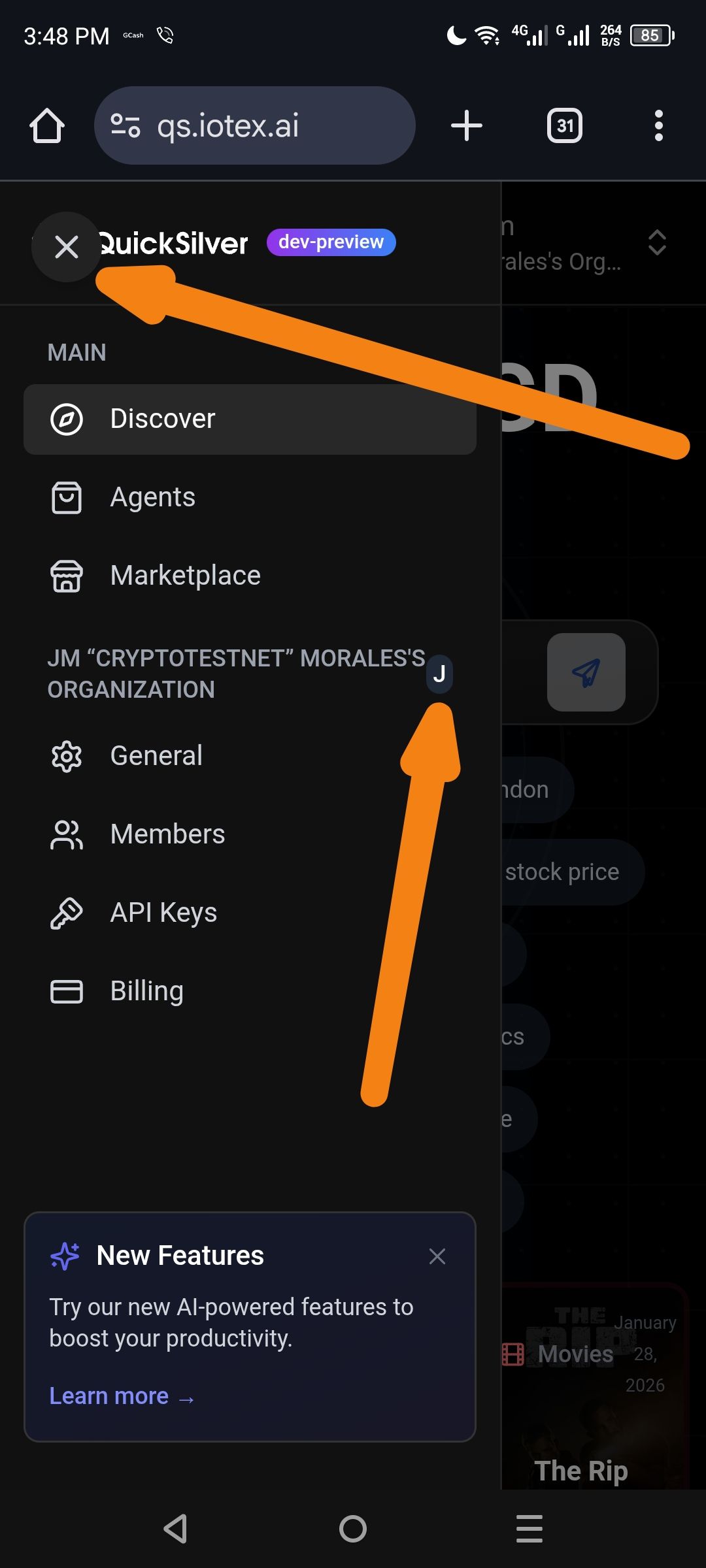
1. Issue: "X" Close Button Overflow
The "X" button used to collapse the sidebar menu is partially overlapping the "QuickSilver" logo/text. It appears to be missing proper padding or is positioned too far to the right within the header container.
2. Issue: Organization Avatar ("J") Misalignment
The circular letter avatar for the organization (labeled "J") is floating outside the intended boundary. Instead of being centered or properly aligned with the organization name, it is shifted too far to the right, overlapping the background/main content area.
Wallet Address: io1tkw393kejmxwnd454twc6020sxcyvh5dxqmren
Device & Environment:
-Operating system: Windows 11 Pro
-Device model: A520MHP
Log in to comment and vote
Comments2
Terry Xu
Feb 6
QS is still in the dev preview stage. We’re still aligning on its positioning and feature adjustments, so we won’t make changes to this for now.
cryptotestnet
Feb 6
The link same in the blog post
https://iotex.io/blog/the-iotex-ecosystem-bounty-program/