[ECO Bounty] QuickSilver Duplicate and Overlapping Date Stamps
1. Summary
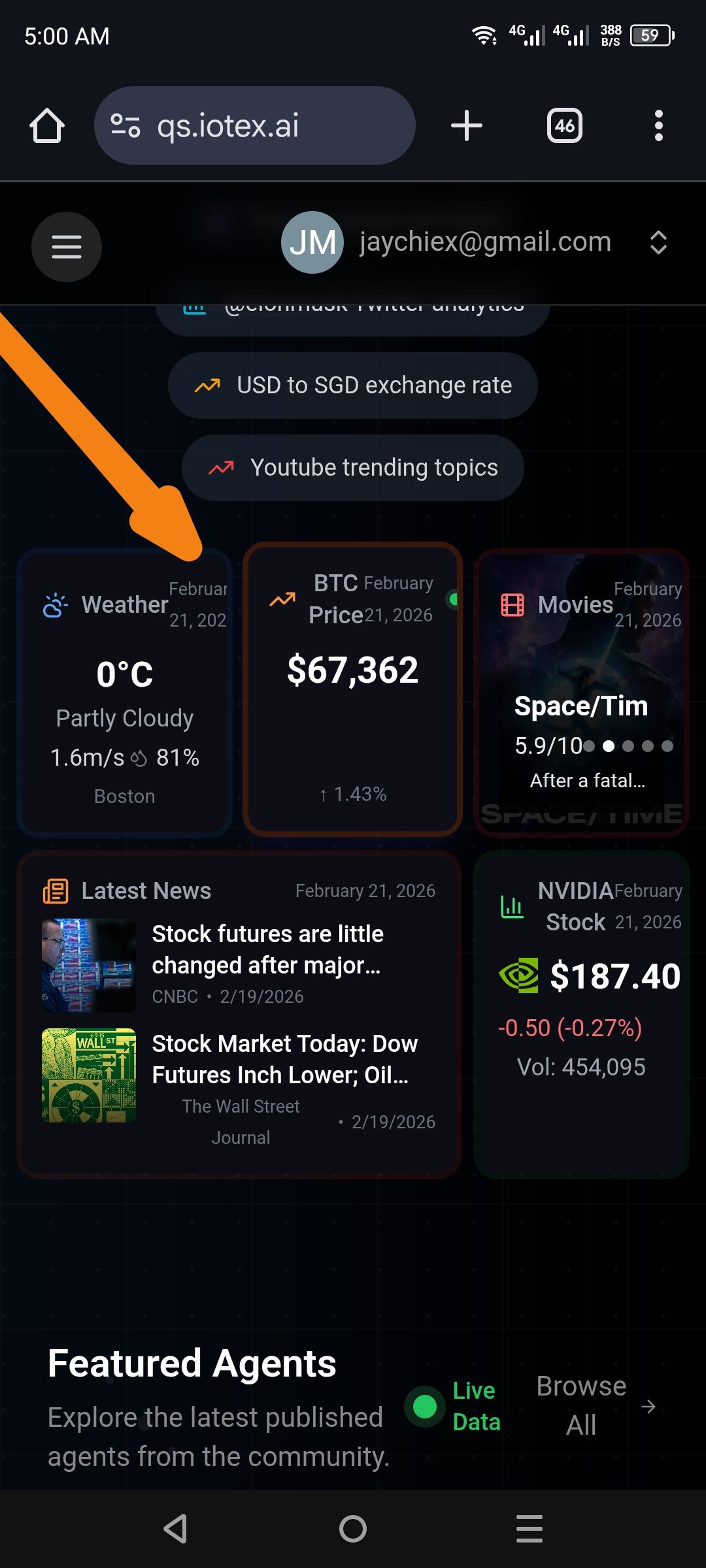
Dashboard widgets (Weather, BTC Price, Movies, etc.) are rendering the current date twice in the upper-right corner. The secondary date string is improperly layered, causing it to overlap with the primary widget title and the first date instance.
2. Environment
URL:
qs.iotex.aiDevice: Mobile (Android/iOS)
3. Steps to Reproduce
Open the QuickSilver dashboard on a mobile browser.
Navigate to the "Featured Agents" section or any grid-based data view.
Examine the top-right corner of the Weather or BTC Price cards.
4. Expected Result
Each widget should display the timestamp or date exactly once in a legible, dedicated space (e.g., a sub-header or a footer).
5. Actual Result
Redundancy: The string "February 21, 2026" is rendered twice within a 50px radius.
Collision: The second date instance is "floating" over the widget title (e.g., covering the letters in "Weather"), suggesting a container overflow or a repeated function call in the frontend template.
6. Visual Evidence
(Your screenshot clearly shows "February 21, 2026" printed twice, with one instance clashing directly with the word "Weather".)
Potential Root Causes
Template Logic Error: The date variable might be called twice in the HTML template (e.g., once in the
card-headerand once in abackground-overlay).Responsive CSS Breakpoint: On mobile, a hidden desktop date element might be triggering
display: blockincorrectly, causing it to stack on top of the mobile-specific date element.
Wallet Address: io1tkw393kejmxwnd454twc6020sxcyvh5dxqmren
Device & Environment:
-Operating system: Android 13
-Device model: Redmi Note 10 Pro
Log in to comment and vote
No comments yet
Be the first to share your thoughts.