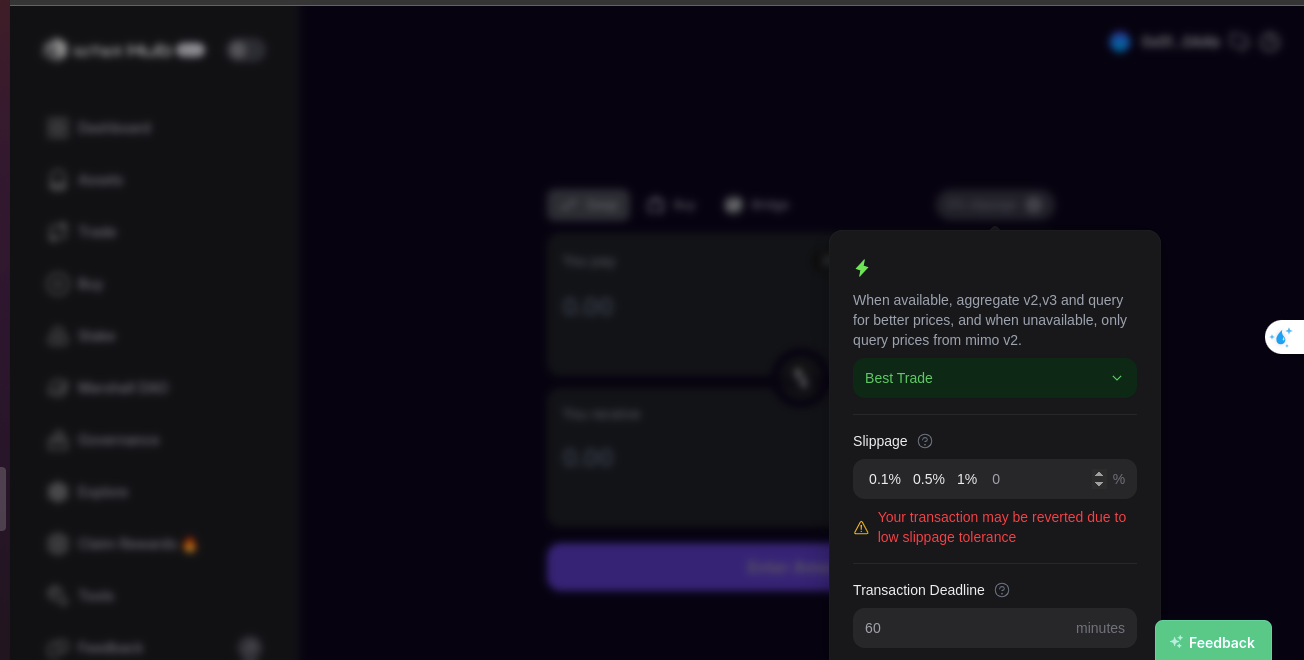
[Eco Bounty] Slippage Settings popup closes on scroll – last input too close to bottom edge
Wallet Address:
0x0f06443fbfc0Eb7D1f1c98DC74005546e2f70AAb
Bug Description:
When the user clicks the Slippage Settings button in the Swap screen, the popup shows correctly.
However, if the user tries to scroll down, the popup closes automatically, breaking the flow.
Also, the “Transaction Deadline” input is pushed too close to the bottom edge, making it hard to see and interact with — padding is missing.
Device & Testing Environment:
Device: Dell Laptop
OS: Ubuntu
Browser: Chrome
Steps to Reproduce:
Go to: https://hub.iotex.io
Navigate to Trade → Swap
Click on the ⚙️ Settings icon near Slippage
Try to scroll within the popup → it closes unexpectedly
Check the bottom input → Transaction Deadline is squeezed to the edge
Actual Result:
Popup closes when scrolling
Last input field has no bottom margin/padding
Expected Result:
Scrolling should be allowed without closing the popup
Add proper bottom padding (e.g., 24px) to improve usability
Log in to comment and vote
Comments3
Terry Xu
Aug 30, 2025
Thanks for sharing your thoughts! The scroll is treated as continuing the swap, so the slippage popup closes. We’ve talked it over and will keep it this way.
Terry Xu
Aug 3, 2025
We couldn't reproduce it. Could you share a screen recording?
klrt0120
Aug 4, 2025