Description
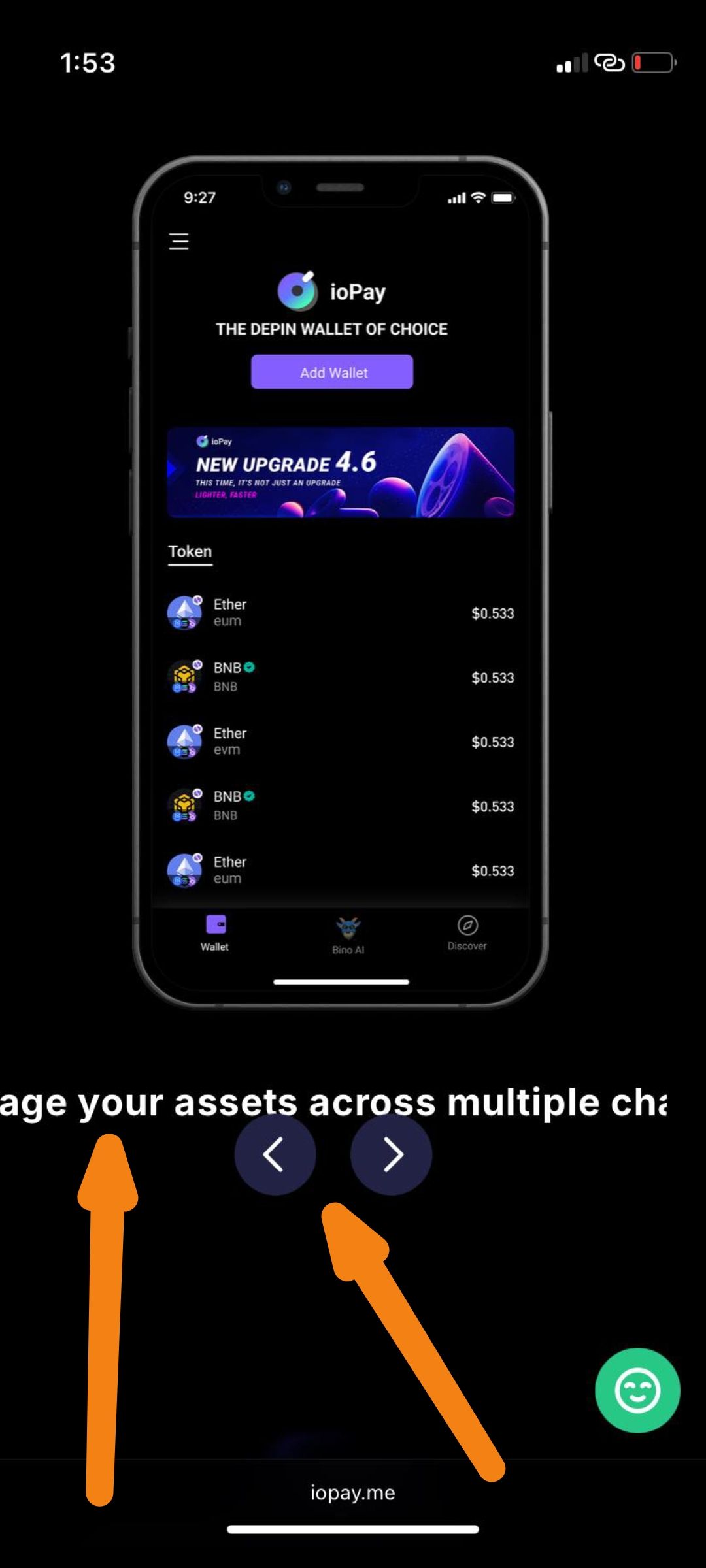
When visiting iopay.me on an iPhone XR device, the landing page exhibits two distinct UI rendering issues:
Text Clipping: The descriptive text beneath the phone mockup is truncated — visible as "age your assets across multiple cha" — indicating the full sentence is being cut off at the screen edge with no text wrapping or responsive adjustment.
Navigation Arrows Overlap: The carousel navigation arrows (‹ ›) are rendered on top of / too close to the text and phone mockup, suggesting a z-index or absolute positioning issue in the responsive layout.
Steps to Reproduce
Open Safari on an iPhone XR running iOS 18.7.3.
Navigate to https://iopay.me.
Scroll down to the phone mockup/carousel section.
Observe the text beneath the phone mockup.
Observe the position of the left (‹) and right (›) navigation arrows.
Expected Behavior
✅ Full promotional text should be fully visible and properly wrapped within the viewport.
✅ Complete sentence should read clearly (e.g., "Manage your assets across multiple chains").
✅ Carousel navigation arrows should be positioned below or cleanly beside the mockup without overlapping content.
✅ Layout should be fully responsive and adapt cleanly to the iPhone XR viewport width.
Actual Behavior
❌ Promotional text is clipped at the left edge, only showing partial sentence: "age your assets across multiple cha..."
❌ Text does not wrap or resize to fit the iPhone XR screen width.
❌ Carousel navigation arrows are overlapping the text area.
❌ Overall layout appears broken and misaligned on this device/browser combination.
Wallet Address:
io1tkw393kejmxwnd454twc6020sxcyvh5dxqmren
Device & Environment:
-Operating system: iOS 18.7.3
-Device model: iPhone XR
