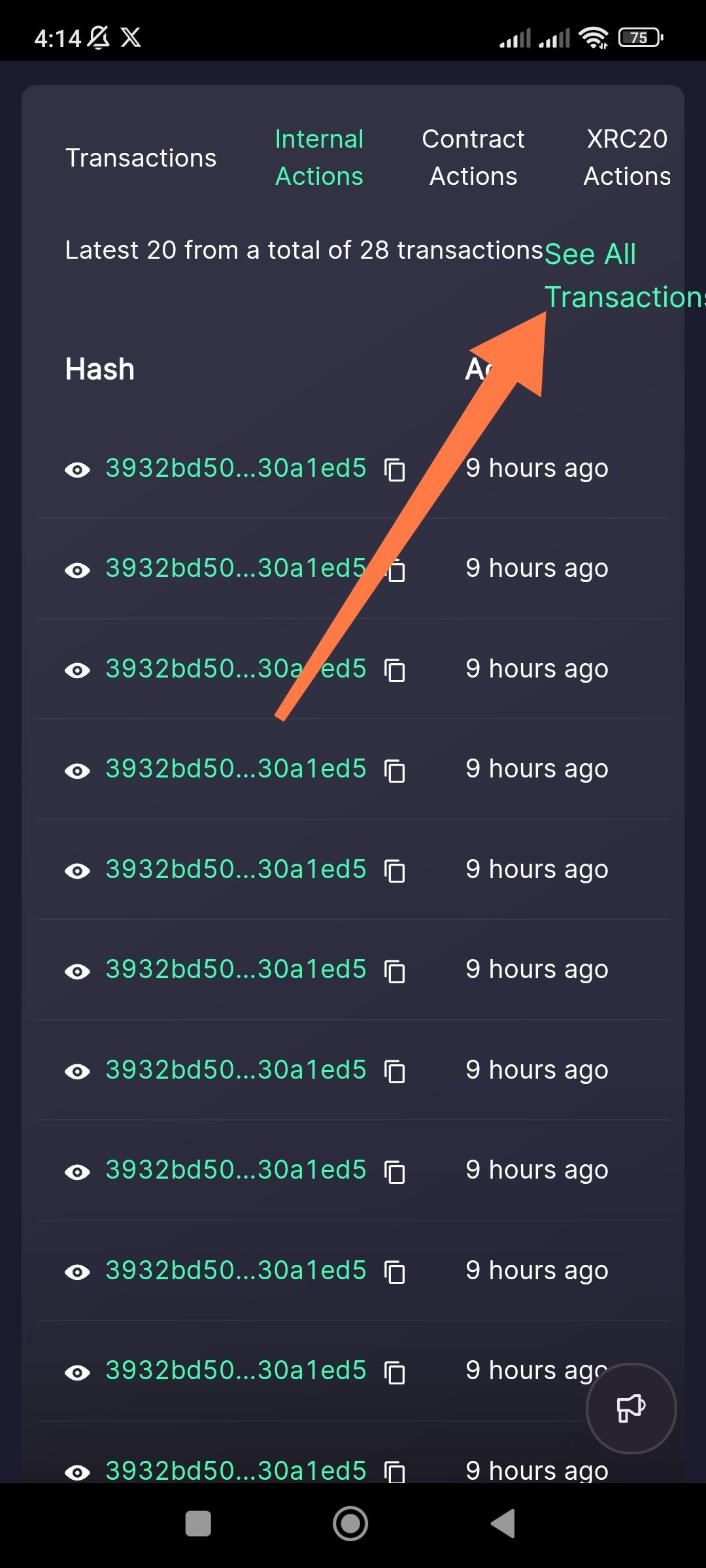
Description: When viewing transaction history (Internal Actions, Contract Actions, etc.) via the integrated IoTeXScan view in the ioPay app, the "See All Transactions" link is improperly aligned. The text is partially cut off at the right edge of the screen, making it difficult to read and interact with.
Steps to Reproduce:
Open the ioPay app.
Navigate to an account's transaction history or a specific action tab (e.g., Internal Actions).
Scroll or locate the "See All Transactions" link on the right side of the header.
Observe the text alignment on the far right of the screen.
Actual Result: The text "See All Transactions" is pushed too far to the right, causing the final letters (specifically the "s") to be clipped or hidden by the screen edge.
Expected Result: The text should have sufficient padding/margin from the right edge of the screen to ensure full visibility and a clean user interface.
Wallet Address: io1tkw393kejmxwnd454twc6020sxcyvh5dxqmren
Device & Environment:
-Operating system: Android 13
-Device model: Redmi Note 10 Pro
