[Eco Bounty]ioPay Bino AI - Irrelevant/Suspicious Links in Response
Summary
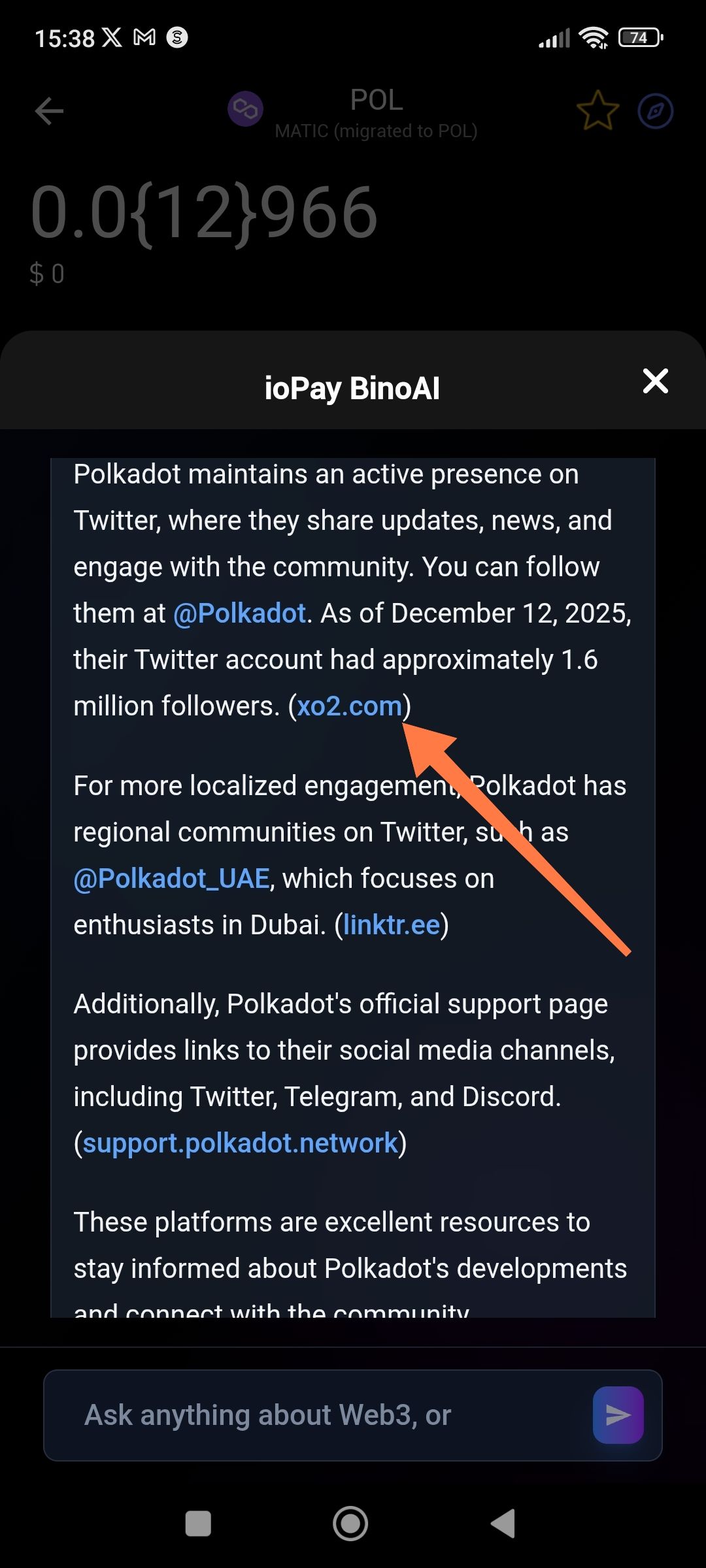
When querying Bino AI about Twitter/social media links, the AI provides unrelated, potentially malicious links (e.g., xo2.com) that do not direct to the requested project's official social media accounts.
Description
The AI assistant within ioPay's Bino AI feature is returning responses that contain irrelevant hyperlinks when users ask for social media links related to a specific project (in this case, Polkadot's Twitter). Instead of providing the official twitter.com link, the AI inserted "xo2.com" as a clickable link, which appears to be an unrelated or potentially suspicious domain. This could pose a security risk to users who may click on these unverified links.
Steps to Reproduce
Open ioPay app
Navigate to Bino AI chat feature
Ask about social media links for a project (e.g., "What is Polkadot's Twitter link?")
Observe the AI response and the hyperlinks provided
Expected Result
The AI should provide official, verified social media links (e.g., https://twitter.com/Polkadot or https://x.com/Polkadot)
All links should direct to legitimate, project-verified domains
Links should be contextually relevant to the query
Actual Result
The AI provided a link to "xo2.com" when referencing Polkadot's Twitter presence
This domain is unrelated to the official Twitter/X platform
Multiple irrelevant links were embedded in the response (xo2.com, linktr.ee without proper context)
Evidence
Screenshot provided showing:
ioPay Bino AI interface
Response discussing Polkadot's Twitter presence
Highlighted link: (xo2.com) - marked with red arrow indicating the problematic link
The link appears after mentioning "@Polkadot" and follower count information
Environment
App: ioPay
Feature: Bino AI
Platform: Android
Date Observed: February 05 2026
Severity
🔴 High - Potential security risk
Impact
Users may click on suspicious/unverified links believing they are official
Potential for phishing attacks or malicious redirects
Erosion of user trust in the AI assistant's reliability
Possible security vulnerability if the AI is sourcing links from unverified databases
Suggested Fix
Immediate: Review and sanitize the AI's link database to remove suspicious domains
Implement link verification: Only allow whitelisted, verified domains (twitter.com, x.com, official project domains)
Add warning labels: For any external links, display a confirmation dialog before opening
Source verification: Ensure the AI only pulls social media links from official project documentation or CoinGecko/CoinMarketCap verified profiles
Regular audits: Periodically review AI-generated links for accuracy and safety
Wallet Address: io1tkw393kejmxwnd454twc6020sxcyvh5dxqmren
Device & Environment:
-Operating system: Android 13
-Device model: Redmi Note 10 Pro
Log in to comment and vote
No comments yet
Be the first to share your thoughts.