[Eco Bounty]ioPay Markets - Missing "Create Custom Group" for Watchlist
Summary
The ioPay Markets interface lacks a feature for users to create, name, or manage custom groups/categories within their Watchlist, limiting the ability to organize tokens by personal preference or portfolio type.
Description
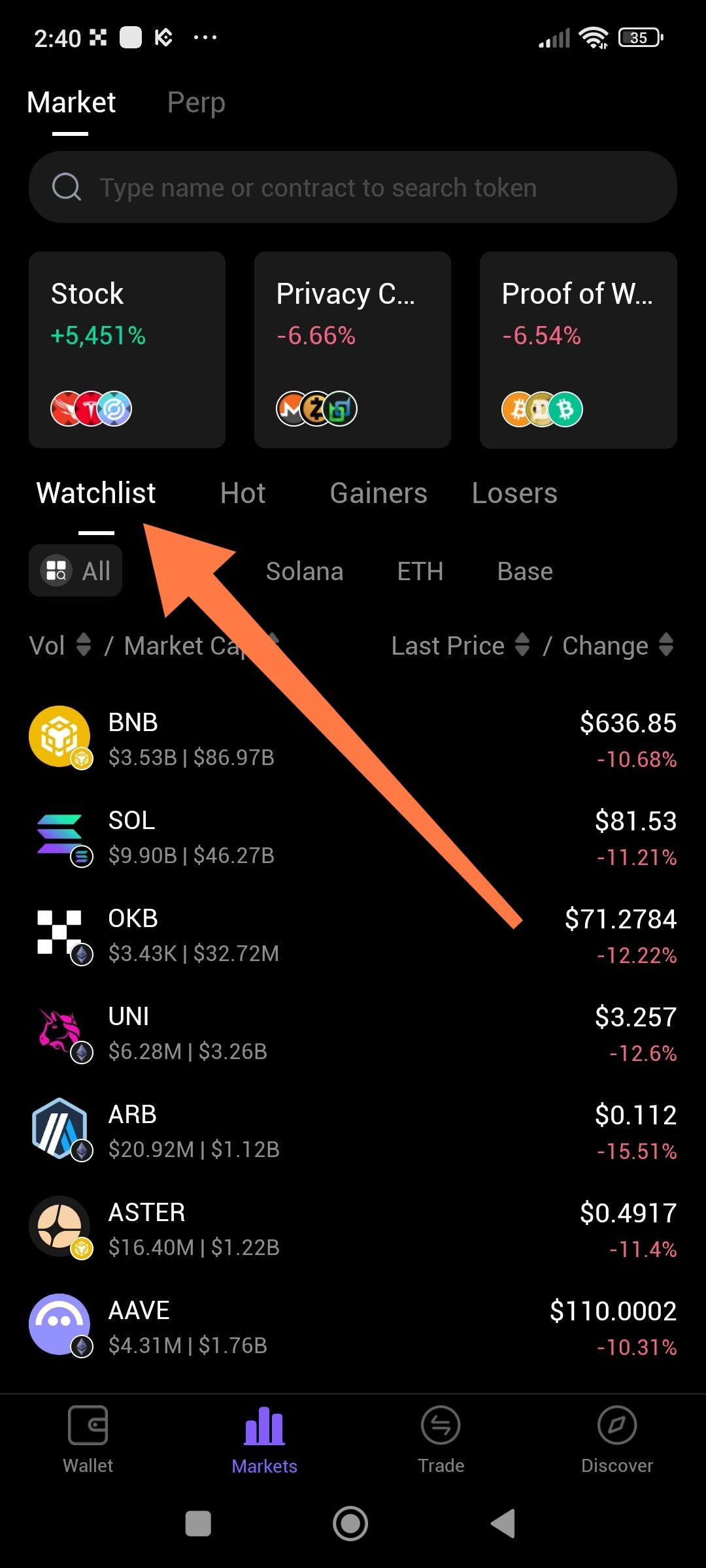
In the "Markets" tab under the "Watchlist" section, there are predefined categories (e.g., Solana, ETH, Base, All). However, there is no button or interface element to allow a user to click "Create New Group" or add a custom name for a list of tokens. This forces all watched tokens into the "All" view or pre-set ecosystem categories, reducing the utility for users tracking specific niche portfolios (e.g., "DeFi", "AI Coins", or "My Holdings").
Steps to Reproduce
Open the ioPay app.
Navigate to the "Markets" tab at the bottom.
Select the "Watchlist" sub-header.
Attempt to find a "+" button or "New Group" option to create a custom category.
Observe that only predefined ecosystem filters are available.
Expected Result
There should be a "Create Group" icon (e.g., a plus sign + or an "Edit" button) that allows users to create custom folders or tabs to organize their watched assets.
Actual Result
Users are restricted to the default categories provided by the app (Solana, BSC, ETH, Base). There is no user-facing way to create a personalized group.
Evidence
Screenshot analysis:
The orange arrow points to the "Watchlist" header.
Below it, buttons for "All", "Solana", "ETH", and "Base" are visible.
There is no "+" icon or "Manage Groups" button visible in the horizontal scroll area or near the search bar.
Environment
App: ioPay Mobile
Feature: Markets / Watchlist
Platform: Mobile Android
Date: February 5th, 2026
Severity
🔵 Low - Feature Request/UI Improvement It does not break the app but significantly limits the user experience for advanced traders and long-term investors.
Suggested Fix
Add a "New Group" button: Place a "+" icon at the end of the scrollable list (next to "Base").
Management Interface: Implement a "Manage Watchlist" screen where users can drag-and-drop tokens into custom folders.
Rename/Delete: Allow users to long-press a custom group to rename or delete it.
Wallet Address: io1tkw393kejmxwnd454twc6020sxcyvh5dxqmren
Device & Environment:
-Operating system: Android 13
-Device model: Redmi Note 10 Pro
Log in to comment and vote
No comments yet
Be the first to share your thoughts.