[Eco Bounty]QS Organization Creation Allows Space-Only Names
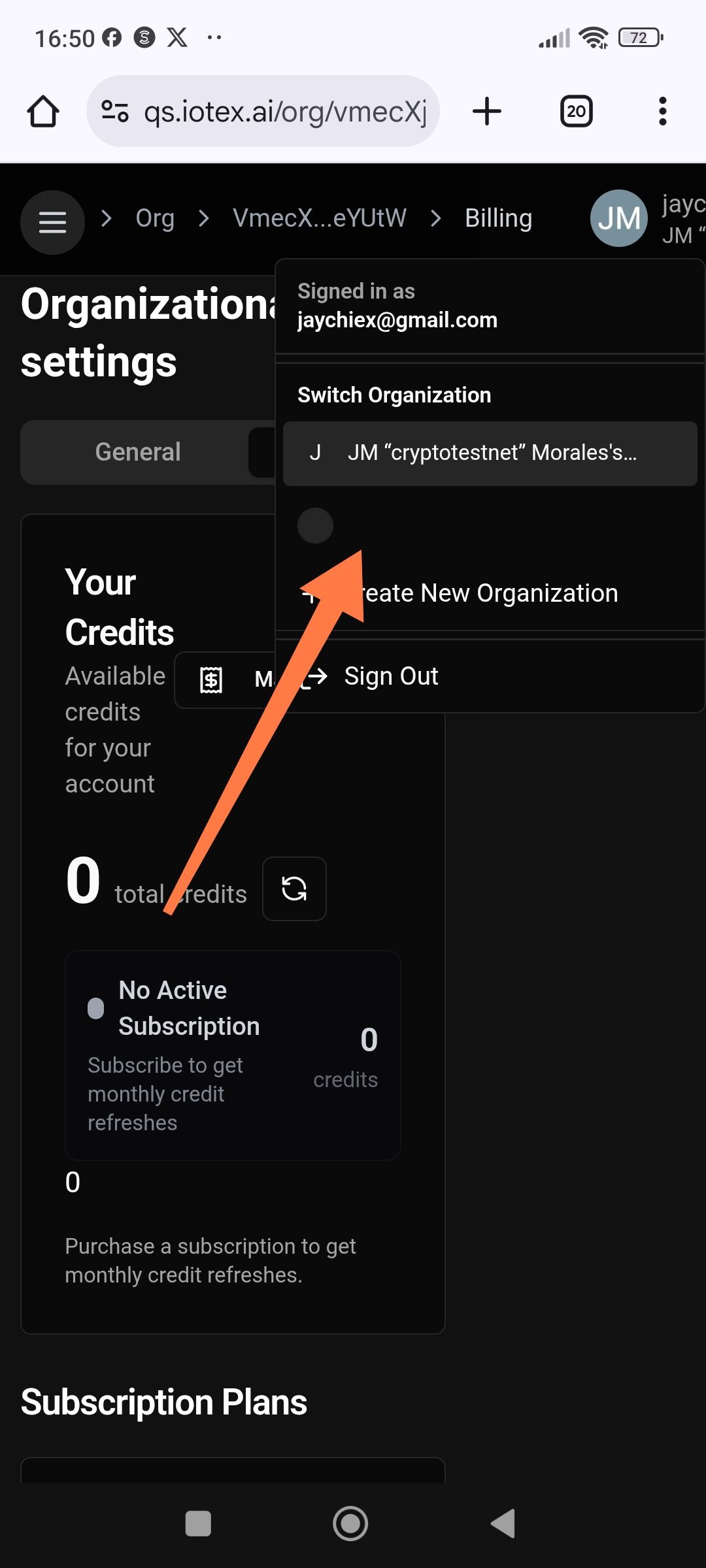
Description: The Quicksilver (qs.iotex.ai) platform allows users to create and save a new organization using only spaces (hitting the space bar) as the name. This results in "invisible" organization entries in the "Switch Organization" dropdown menu, which can lead to navigation confusion and UI inconsistencies.
Steps to Reproduce:
Log in to qs.iotex.ai.
Open the user profile/organization menu and select "+ Create New Organization".
In the "Organization Name" input field, press the space bar one or more times.
Click "Create" or "Save".
Open the "Switch Organization" dropdown menu again.
Expected Behavior: The system should validate the input field. It should not allow organization creation if the name is empty or consists only of whitespace. An error message (e.g., "Name cannot be empty") should appear.
Actual Behavior: The organization is successfully created. In the dropdown menu, the organization appears as a blank/empty row (as indicated by the arrow in the screenshot), making it difficult for the user to identify or select it later.
Suggested Fix: Implement a trim validation on the input field (e.g., if (name.trim().length === 0)) to ensure that organization names contain at least one non-whitespace character before allowing the form to be submitted.
Wallet Address: io1tkw393kejmxwnd454twc6020sxcyvh5dxqmren
Device & Environment:
-Operating system: Android 13
-Device model: Redmi Note 10 Pro
Log in to comment and vote
No comments yet
Be the first to share your thoughts.